

AI · workspace · collaboration · ChatGPT · Claude · Gemini · productivity
Mantle Chat Features: Your Complete Guide to AI Workspace & Collaboration
By Mantle Chat Team · Oct 21, 2025 · 16 min read

Discover how Mantle Chat brings together ChatGPT, Claude, Gemini, Grok, and DeepSeek in one powerful workspace. Learn about workspaces, real-time collaboration, and the features that make AI more accessible for individuals and teams.
What Makes Mantle Chat Different?
Think of Mantle Chat as your centralized command center for AI work. Instead of maintaining separate accounts for ChatGPT, Claude, and Gemini (and paying for each), you get them all in one place. But that's just the beginning.
One Platform, Every Leading AI Model
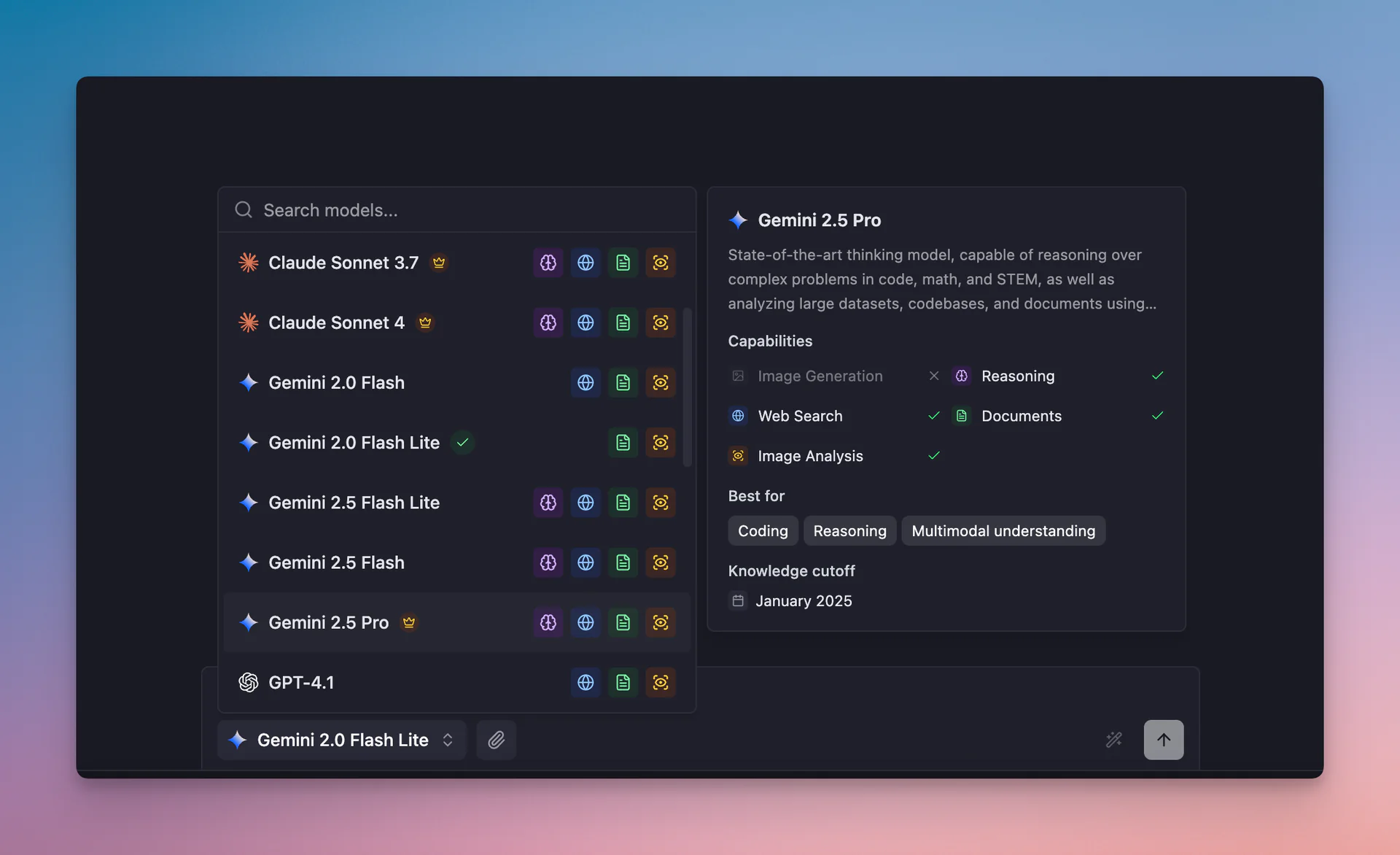
Mantle Chat gives you instant access to the industry's leading AI models — now spanning five providers, not just the big three:
- ChatGPT (GPT-5 series, GPT-4.1, GPT-4o, plus o-series reasoning models) – OpenAI's best-in-class models for coding, reasoning, and general tasks
- Claude (Opus 4.7, Sonnet 4.5, Haiku 4.5) – Anthropic's models, excelling at long-form writing, code generation, and careful, complex reasoning
- Gemini (Gemini 3 Pro, Gemini 3 Flash, 2.5 Pro) – Google's most powerful thinking models, with exceptional coding and multimodal capabilities
- Grok (Grok 4, Grok 4.1 Fast, Grok 3) – xAI's fast, up-to-the-minute models
- DeepSeek (V3.2, R1) – strong open-weight models for reasoning and coding, often at a lower cost
You can switch between models mid-conversation without losing context. Ask ChatGPT a question, then regenerate the same response with Claude or Gemini to compare perspectives. All your conversation history stays intact.
Personal Workspaces
Your private workspace is like having ChatGPT, Claude, and Gemini – but all together in one organized space. Every conversation is completely private, and you can:
- Switch models instantly during any conversation for optimal results
- Organize by project using folders (perfect for clients, topics, or projects)
- Keep everything accessible with full conversation history and search
Think of it as your personal AI library, where every conversation is saved, searchable, and ready when you need it.
Shared Workspaces for Teams
Inspired by how Slack organizes teams into channels and Notion structures knowledge, our shared workspaces bring that same organization to AI conversations:
- Invite team members and collaborate in real-time
- Create channels for different projects or topics
- Share discoveries with full context preserved
- Work together with presence indicators and typing status
It's collaboration built for the AI era – where teams and AI work together seamlessly.
Now that you understand how Mantle Chat organizes your AI work through personal and shared workspaces, let's dive deeper into the specific features that make your daily interactions with AI more powerful and productive.
Core AI Chat Features
Streaming Responses
Watch AI responses appear in real-time as they're generated. No more staring at loading spinners – you see the answer forming word by word, just like typing. This makes conversations feel natural and lets you stop generation early if you've already gotten the answer you need.
Message Regeneration & Model Switching
Not happy with a response? Hover over any AI message and click regenerate to get a fresh perspective. Even better – switch to a different AI model to see how ChatGPT, Claude, or Gemini would answer the same question differently.
This feature is incredibly powerful for:
- Comparing model approaches to complex problems
- Getting alternative explanations of difficult concepts
- Finding the best answer by leveraging different model strengths
Edit & Resend Messages
Crafting the perfect prompt is an art. With message editing, you can refine your questions without starting over:
- Ask your initial question
- See the response
- Edit your original message to add more detail or context
- Get a new response based on your improved prompt
All previous context is preserved, making this perfect for iterative refinement. Note: Message editing is available in personal chats only to maintain conversation integrity in group settings.
Stop Generation Anytime
When the AI is generating a response, a stop button appears. Click it to immediately halt generation – the partial response is automatically saved so you can read what was generated. This saves time when:
- The AI is going in the wrong direction
- You've already gotten the information you need
- You want to save token usage on lengthy responses
Code Syntax Highlighting
Code in AI responses gets beautiful syntax highlighting automatically. Whether you're working with Python, JavaScript, TypeScript, React, SQL, or any of dozens of supported languages, your code is formatted with:
- Proper indentation
- Color-coded keywords and syntax
- Theme-aware styling (adapts to light/dark mode)
- Professional formatting that's easy to read
Perfect for developers who use AI for coding assistance, documentation, or learning.
File Attachments
Upload images, documents, PDFs, and other files directly in your conversations. AI models that support vision and document analysis can help you:
- Analyze charts and diagrams
- Extract text from images
- Review and summarize documents
- Answer questions about uploaded files
Organization That Actually Works
Folders for Everything
Create folders to organize conversations by project, client, or topic. Whether you're managing:
- Multiple client projects
- Personal learning topics
- Work vs. personal discussions
- Team collaborations by department
Folders keep everything neat and accessible. Drag and drop conversations to reorganize anytime.
Smart Search
Find any conversation instantly with full-text search across all your threads. Search works across:
- Conversation titles
- Message content
- Model used
- Workspace or folder names
No more scrolling through endless chat history – just type what you're looking for.
Chat Management
Every conversation is a chat with its own:
- Persistent history (never disappears)
- Shareable link (when you're ready to collaborate)
- Independent model selection
- Organized placement in folders
Rename chats, archive old ones, or delete what you don't need. You're in complete control.
Real-Time Collaboration Features
Share Any Conversation
Found something useful? Share it with teammates by moving a chat in a shared workspace. Full conversation context comes along, so everyone sees the complete discussion – not just the final answer.
Live Presence & Typing Indicators
Know when teammates are viewing or typing in shared conversations:
- Green dot shows who's actively viewing
- Typing indicator shows who's composing a message
- Real-time sync means messages appear instantly for everyone
Team Channels
Create dedicated channels for different teams, projects, or topics. Mention AI models directly (like @ChatGPT or @Claude) and they'll join the conversation. Perfect for:
- Brainstorming sessions with teammates + AI
- Project-specific discussions
- Department channels with AI assistance
- Knowledge sharing across teams
Secure Share Links
Need to share a conversation outside your team? Generate a secure, time-limited link that anyone can view. Great for:
- Sharing AI insights with clients
- Posting helpful conversations publicly
- Collaborating with external partners
- Creating documentation from AI discussions
Productivity Tools
Conversation Summaries
Long conversations getting hard to follow? Mantle Chat can generate concise summaries of any thread, highlighting key points and decisions. Perfect for:
- Team standups
- Project handoffs
- Executive summaries
- Quick refreshers on past discussions
Quick Access Shortcuts
Keyboard shortcuts get you where you need to go fast:
Cmd/Ctrl + K– Quick switcher to jump between workspaces and threadsCmd/Ctrl + N– New conversationCmd/Ctrl + F– Search- And many more for power users
Pin Important Chats and Channels
Pin your most important conversations to the top of your sidebar. They stay accessible regardless of when they were last updated – perfect for:
- Reference materials you consult frequently
- Active projects you're working on daily
- Important team channels
- Templates and saved prompts
Customization & Preferences
Dark Mode
Full dark mode support that's easy on the eyes during late-night work sessions. The entire interface adapts, including:
- UI elements and backgrounds
- Code syntax highlighting
- Videos and screenshots
- Shared links and embeds
Model Management
Visit the All Models settings page to customize which models appear in your selector. Show or hide models based on your preferences and workflow – keep your interface clean and focused on the tools you actually use.
Data & Privacy You Can Trust
Your Data, Your Control
Export all your conversations and manage your information with complete transparency:
- Data export in standard formats (JSON, CSV)
- Conversation history fully downloadable
- Account deletion completely removes all data
- Privacy-first design – your conversations stay private
Accessibility Built In
Mantle Chat is built with accessibility in mind:
- Keyboard navigation throughout the entire app
- Screen reader support with ARIA labels
- Clear visual feedback for all interactions
- Focus indicators for keyboard users
What's New in 2026
Mantle Chat has grown a lot since launch. Some of the biggest recent additions:
- More models – beyond ChatGPT, Claude, and Gemini, you can now use Grok (xAI) and DeepSeek in the same workspace.
- Voice-to-text – dictate prompts hands-free with fast, accurate voice input.
- Tasks & agents – hand off multi-step work to AI agents and let recurring tasks run in the background.
- Integrations – connect the tools your team already uses so AI can act with real context.
- Threads – branch a conversation into a focused side-thread without losing the main discussion.
- Direct messages & organizations – message teammates directly and manage your whole company in one org.
- Desktop & mobile – a native desktop app (in alpha), with an iOS app on the way.
Getting Started Is Simple
- Visit mantle.chat and create a free account
- Create your first workspace and start a conversation
- Switch between AI models to find what works best for your task
- Organize with folders as your conversations grow
- Invite teammates when you're ready to collaborate
Ready to Try Mantle Chat?
The future of AI work is collaborative, organized, and accessible. Mantle Chat brings that future to your team today.
No credit card required. No complex setup. Just powerful AI tools that work the way you do.