

monthly-update · pricing · ai-models · desktop-app · collaboration · performance · product-updates
Mantle Chat Monthly Update: August 2026
By Mantle Chat Team · Sep 4, 2026 · 14 min read
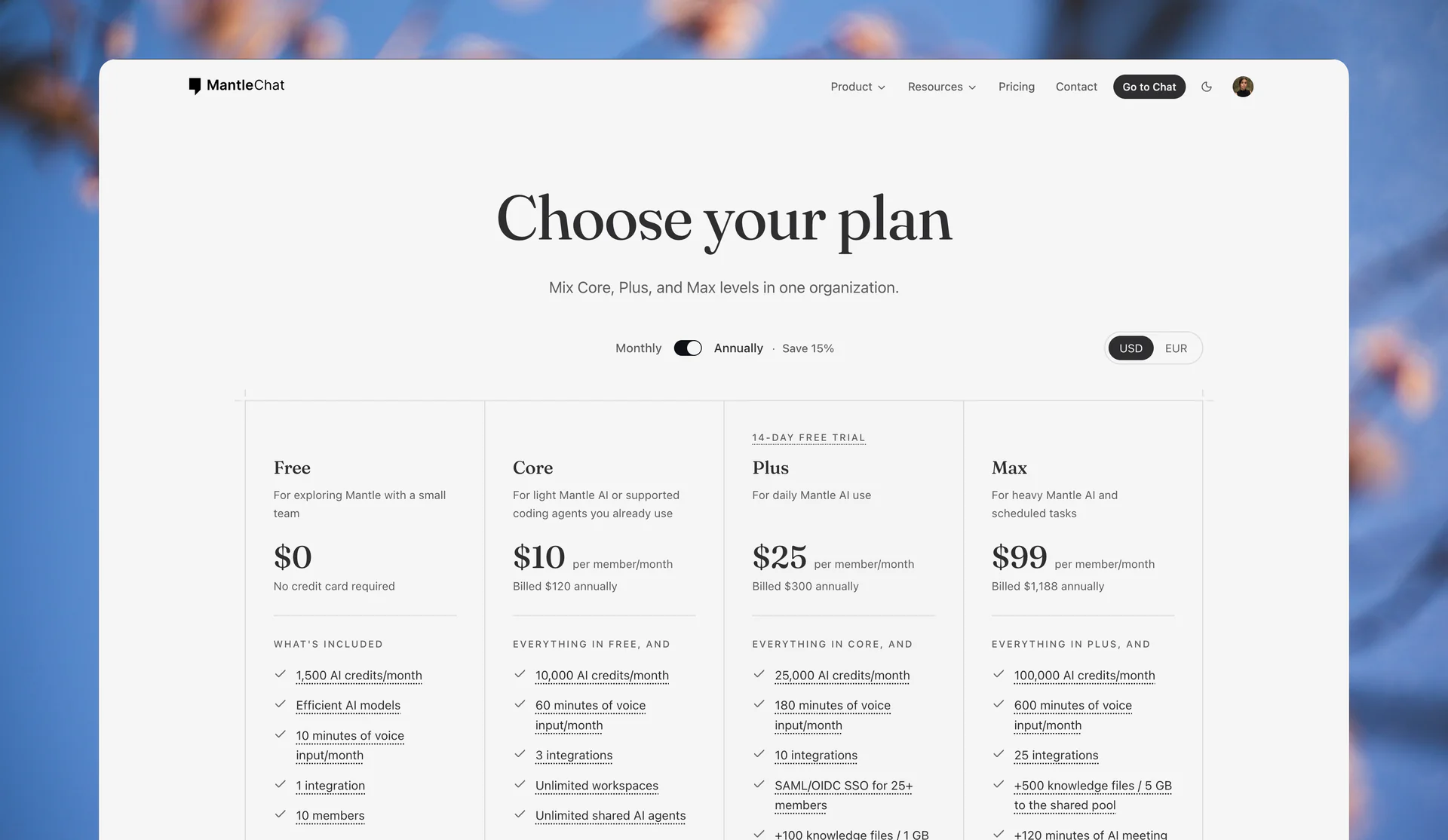
August made Mantle Chat easier to choose, easier to join, and easier to use every day.
We introduced a new set of plans for individuals and teams, refreshed the hosted model catalog around 25 current models from eight providers, and added work-email sign-in. Mantle Chat Desktop (Alpha) gained support for more of the AI subscriptions and local tools people already use. We also redesigned the public website, rewrote the user guide, made workspace references portable, and rebuilt the way images are prepared and displayed.
Underneath those visible changes, we kept working on the details that make a shared AI workspace feel dependable: presence, notifications, long conversations, threads, emoji, Canvas collaboration, workspace access, AI streaming, and account recovery.
This month we:
- Introduced clearer Free, Core, Plus, Max, and Enterprise plans, with monthly or annual billing, USD or EUR pricing, and the ability to mix paid levels inside one organization.
- Refreshed Mantle Chat's hosted AI catalog to 25 models across eight providers, including six models available on the Free plan.
- Expanded Bring Your Own AI in Mantle Chat Desktop, with support for Codex, Claude Code, Cursor, Grok CLI, and OpenCode connections on Mac.
- Added work-email sign-in, so Google is no longer the only way to create or access a registered account.
- Redesigned the Mantle Chat website and rewrote the user guide, making the product easier to understand before and after you join.
- Made workspace items easier to reference and images faster to view, without weakening access controls or giving up original files.
- Improved conversation reliability and everyday collaboration across messages, threads, notifications, presence, emoji, Canvas, and AI responses.
Let's walk through it.
Plans That Fit Solo Users and Mixed Teams
Mantle Chat now has five clearer plans: Free, Core, Plus, Max, and Enterprise.
Core, Plus, and Max work for both individuals and teams. A solo user can choose the level that matches their own AI usage, while an organization can mix levels instead of putting every member on the same plan.
How a Mixed Team Could Use It
Imagine a developer and product manager working together:
- Developer — Core: The developer already does most of their hands-on coding with Claude Code. They can connect that existing access through Mantle Chat Desktop, keep useful coding discussions with the team, and use Core for their lighter hosted-model needs.
- Product manager — Max: The product manager uses hosted models throughout the day to research decisions, build shared agents, and automate recurring work. For example, an agent could prepare a weekly project update, summarize new product feedback into themes, or run a scheduled launch-readiness review. Max gives them the larger individual credit balance their workflow needs.
Both people still collaborate in the same Mantle Chat organization and workspaces. The plan follows each person's AI usage rather than forcing the whole team into one level — and a job title never determines which plan someone must choose.
Each paid member gets a separate monthly credit balance, so one person's work does not unexpectedly consume another person's allowance. Shared features such as Workspace Context and Huddle transcription use organization-level pools because the resulting knowledge belongs to the team.
The new plan experience also includes:
- Monthly or annual billing: Choose the commitment that fits the way you work.
- USD or EUR pricing: View and pay in the currency that makes sense for your organization.
- A 14-day Plus trial: Explore the paid experience after adding a verified payment method.
- Prepaid credit packs: Add a fixed amount when you need more instead of enabling surprise overage charges.
- Clear model access: See which models are included with Free and which are available across the paid plans.
- Straightforward team composition: Mix Core, Plus, and Max members while keeping one shared workspace.
Free remains a useful way to get started, with monthly credits, access to six hosted models, collaboration for up to ten members, three workspaces, two shared agents, and 90 days of history. Paid plans add more credits and models, unlimited history, scheduled tasks, and larger shared allowances as you move up.
A Current 25-Model Catalog Across Eight Providers
Models move quickly. A useful model picker should help you reach the best current options without making you sort through a museum of overlapping releases.
In August, we reviewed the entire hosted catalog, verified each addition with its provider, added 15 current models, and removed 12 older or redundant options. The result is a focused lineup of 25 hosted models across Anthropic, OpenAI, Google, xAI, DeepSeek, Moonshot AI, Z.AI, and Mistral AI.
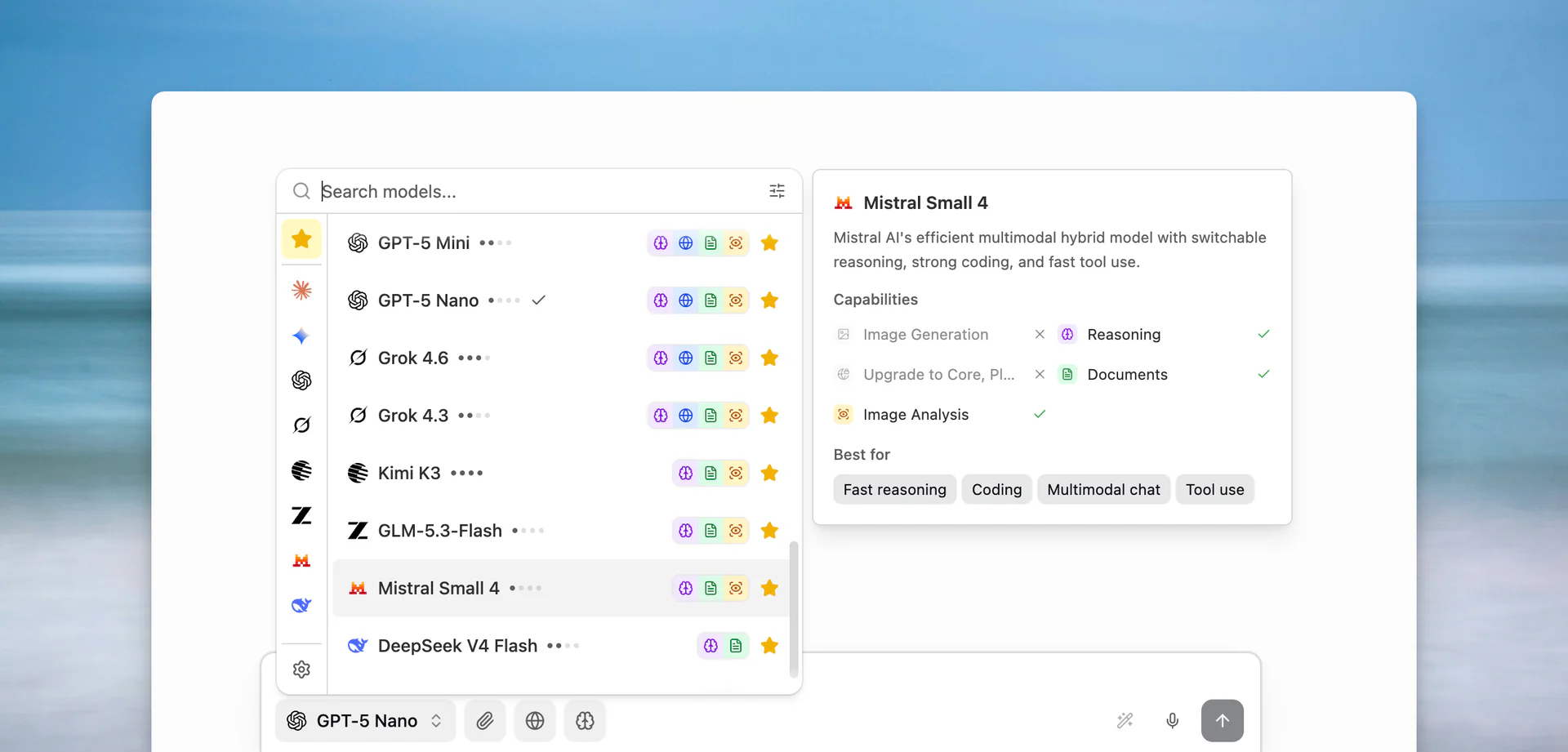
The catalog now includes models such as Claude Opus 5 and Sonnet 5, the GPT-5.6 family, Gemini 3.7 Flash and Gemini 3.1 Pro, Grok 4.6, Kimi K3, GLM-5.3-Flash, Mistral Small 4, and DeepSeek V4 Flash and Pro.
Free members can choose from six models:
- GPT-5.6 Luna
- GPT-5 Nano
- Gemini 2.5 Flash-Lite
- DeepSeek V4 Flash
- GLM-5.3-Flash
- Mistral Small 4
Paid members can use the complete 25-model catalog. The model picker and pricing page also explain relative usage costs, making it easier to decide when a fast, economical model is enough and when a more capable model is worth the additional credits.
This is not about having the longest possible list. It is about keeping Mantle Chat's choices current, tested, and understandable.
More Ways to Bring Your Own AI to Mantle Chat Desktop
Mantle Chat Desktop (Alpha) lets you bring supported AI access from tools and subscriptions already available on your Mac into the conversations where your work happens.
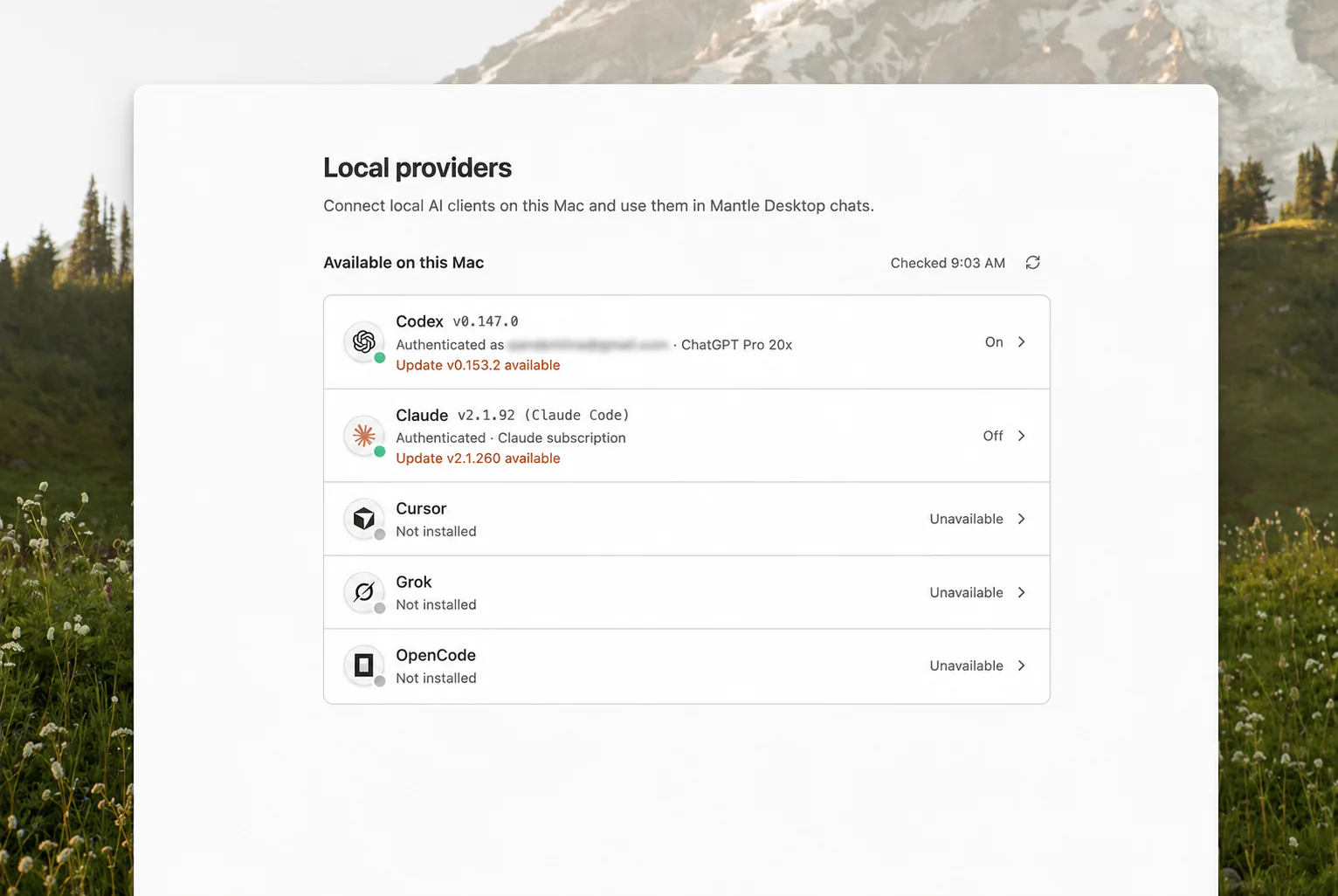
The connection list now includes:
- Codex: Use supported access from your ChatGPT plan through Codex.
- Claude Code: Use the Claude subscription signed in on your Mac.
- Cursor: Use the Cursor subscription signed in on your Mac.
- Grok CLI: Use the Grok account signed in through the command-line tool.
- OpenCode: Use your OpenCode account and its configured providers.
Desktop discovers the models available through each connected provider and keeps provider-specific settings, reasoning, and tool activity understandable inside Mantle Chat. You can mention one of those models in a conversation, receive the response where your team is already working, and keep the result beside the rest of the project context.
This remains an Alpha experience. Provider tools and subscription terms can change, and we are continuing to improve setup, compatibility, and recovery. The direction, however, is simple: individual AI access becomes more useful when its output can participate in shared work.
Download Mantle Chat Desktop (Alpha) for Mac →
Sign In With Your Work Email
Google sign-in is convenient, but it should not be the only route into Mantle Chat.
Registered users can now continue with a work email and complete sign-in through a secure email link. The flow preserves the page you were trying to reach, so accepting an invitation or opening a shared destination does not send you back to an unrelated starting point after authentication.
Google sign-in remains available. Work-email sign-in simply gives more people and organizations a route that matches their account policies and everyday habits.
A New Public Face for Mantle Chat
We redesigned the Mantle Chat website to explain the product with the same clarity we want inside the app.
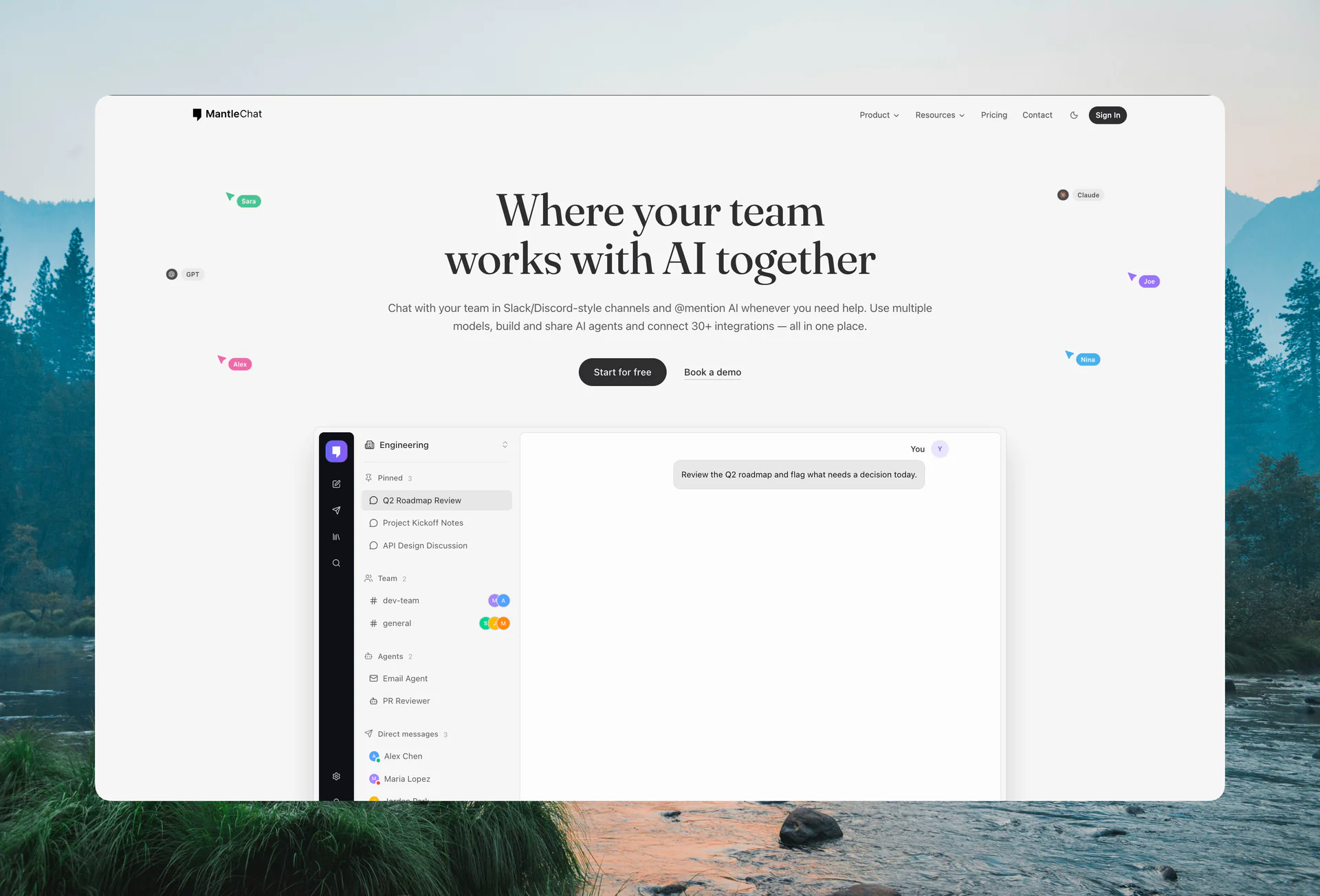
The new editorial design introduces a more distinctive visual system, clearer navigation, consistent light and dark themes, and updated product illustrations. It also creates a stronger path from the homepage to the part of Mantle Chat you want to understand. The homepage now combines the product story with an interactive demonstration and a guided product tour, so visitors can see how Mantle Chat works before creating an account.
We also rebuilt the pages for Chat, Channels, Agents, Tasks, Integrations, Calls, Canvases, and Knowledge. Pricing, About, Contact, Downloads, and the Blog now share the same structure and visual language instead of feeling like separate parts of the site.
The goal was not decoration for its own sake. It was to answer practical questions earlier: What is Mantle Chat? How does it differ from an individual AI chat? Where do agents, shared knowledge, conversations, documents, and calls fit together? And how can a team start small without choosing its entire future workflow on day one?
Explore the redesigned Mantle Chat website →
A User Guide for the Whole Product
Once someone joins Mantle Chat, the next question is usually not “What features exist?” It is “How do I use them together?”
August's documentation rewrite turns the user guide into a connected explanation of the product. It starts with a quickstart and a map of how Mantle Chat's concepts fit together. From there, it covers chats, models, channels, messages, threads, direct messages, calls, Canvases, Workspace Knowledge, search, Agents, Tasks, triggers, integrations, members, permissions, notifications, sharing, Desktop, and plans.
The guide is organized around real workflows rather than isolated settings. That makes it useful both when you are learning Mantle Chat for the first time and when you need a precise answer later.
Read the Mantle Chat user guide →
References Turn Workspace Items Into Shared Context
A shared workspace contains more than messages. It contains conversations, documents, agents, tasks, people, and model choices — and teams regularly need to point from one of those things to another.
Mantle Chat now supports durable references to messages, chats, channels, Canvases, agents, tasks, users, and models. You can copy a link to an item and paste it back into Mantle Chat as a rich reference instead of leaving behind an opaque URL. References can show a useful label, open the correct destination, and provide a preview where appropriate.
That makes everyday instructions more precise:
- Message: “Use the decision in this message.”
- Canvas: “Continue the launch plan in this Canvas.”
- Agent: “Ask this agent to review the task.”
- Channel: “Move the discussion into this channel.”
The reference still follows Mantle Chat's access rules. A link does not grant permission to a private conversation, and private direct-message details are not exposed to someone who cannot open them.
Images Load Faster Without Giving Up Originals
Images in chats, channels, direct messages, threads, Canvases, and shared pages now move through a dedicated media pipeline built for faster viewing.
Instead of downloading a full original every time an image appears in a conversation, Mantle Chat can serve a correctly sized, optimized rendition and show a soft placeholder while it loads. The interface knows the image's dimensions in advance, so messages shift less as media appears. Opening the lightbox keeps the natural aspect ratio, while the original remains available when you need to download it.
This work also keeps privacy in view. Private media still requires authorized access, and optimized renditions remove embedded metadata that does not need to travel with a displayed image. Originals remain protected rather than becoming public assets for the sake of speed.
The result is especially noticeable in image-heavy conversations: faster previews, steadier layouts, and less unnecessary data transfer.
Conversations Feel More Reliable
Many of August's improvements are small in isolation and meaningful in combination. They reduce the number of moments where a conversation loses its place, shows stale state, or asks you to repeat an action.
Better Navigation and Message Rendering
Long chats and threads now use a more stable message scroller with a turn tracker along the right edge. Older messages can load without pulling you away from what you were reading, while the tracker makes it easier to understand where you are in a long AI exchange.
We also standardized message, attachment, preview, action, and agent-activity presentation across conversation types. Web-search progress and results stay in a single response bubble, nested lists preserve their structure, and reply quotes in direct messages render consistently after reloads.
If you edit a message to mention a model, Mantle Chat now triggers the intended AI response reliably. Regenerating an answer from a thread works again too, including in direct messages.
Emoji That Behave the Same Everywhere
Custom emoji shortcodes now work across Mantle Chat's rich-text editors, with sensible fallbacks in copied content, exported content, notifications, and public views. Frequently used reactions appear in their own section, making the reactions you actually choose easier to reach.
Emoji-only messages receive a larger treatment, and hovering an emoji can reveal its name without slowing down the rest of the conversation. Custom emoji remain scoped to the organization that owns them.
Presence and Notifications That Recover
Presence now distinguishes active, idle, and away states more reliably and repairs itself after reconnects. Your own avatar and presence menu stay in sync with the state teammates see.
Notifications can load a longer history as you scroll, while unread counts recover after reconnects, background periods, and missed realtime updates. Mentions more consistently produce the intended notification and sound, without duplicating recipients in thread suggestions.
Safer Recovery Across Workspaces and Canvas
If your access to a channel or workspace changes while Mantle Chat Desktop is open, the app now detects the stale selection and moves to a valid destination instead of leaving you in the wrong conversation. Organization membership changes, including owner transfer and task handling, also recover more safely.
Canvas collaboration now reconnects awareness more reliably and avoids repeated workspace requests that could slow a busy session. These are quiet fixes, but they matter when several people are editing and moving between conversations throughout the day.
Safer Foundations for AI, Agents, and Integrations
August also included foundational work that is intentionally less visible.
We upgraded the runtime behind hosted AI responses and improved the way Mantle Chat handles structured results, tool activity, retries, and long streaming answers. Operational tracing remains privacy-aware: it can help us understand whether a request succeeded without turning prompts, message bodies, or model output into analytics content.
We also strengthened how integration access belongs to a person or organization, how that access is checked before a tool runs, and how proposed agent changes can be represented for review. Some of the agent-authoring and external-tool work built this month is still under development, so we are not presenting it as a public launch. The purpose of that groundwork is to make future capabilities reviewable and permission-aware from the beginning.
What August Sets Up
August brought several parts of Mantle Chat into closer alignment.
The new plans match the way individuals and mixed teams actually adopt AI. The refreshed model catalog gives those plans a current set of choices. Desktop connections let people bring more of their existing AI access into shared conversations. Work-email sign-in opens the door to more organizations. The redesigned website explains the idea, while the new user guide helps people put it into practice.
References and faster media make information easier to carry through the workspace. The reliability work makes that workspace calmer as conversations grow, teammates reconnect, and AI responses become more complex.
We will keep refining the public experience, expanding the Desktop Alpha carefully, and making the path from an individual question to durable team knowledge feel increasingly natural.
Thank You
Thank you to everyone who tested the new plans, tried a newly added model, connected a local provider, or reported one of the everyday details that did not feel quite right. August's work spans pricing pages, model endpoints, image loading, message lists, sign-in links, notification recovery, and dozens of smaller interactions because a collaborative product only feels coherent when those parts agree.
Keep sending us the specific moments that help or get in the way. They are how Mantle Chat improves.
Connect With Us
Have questions or feedback? We'd love to hear from you:
- LinkedIn: linkedin.com/company/mantlechat
- Product Hunt: producthunt.com/products/mantle
- Peerlist: peerlist.io/katja/project/mantle-chat
- X/Twitter: x.com/mantlechat
- Instagram: instagram.com/mantle.chat
- YouTube: youtube.com/@mantlechat
- Discord: discord.gg/STzq94kdDC
Let's build the future of AI collaboration together. 🚀
— The Mantle Chat Team