

monthly-update · mantle-ai · image-generation · canvas · voice-huddles · ai-models · desktop-app
Mantle Chat Monthly Update: September 2026
By Mantle Chat Team · Oct 4, 2026 · 15 min read

September made Mantle Chat more helpful in two directions at once.
You can now open Mantle AI throughout the product and ask for help with the page in front of you. AI chats on paid plans gained image generation, Canvases gained anchored discussions, Huddles gained video and screen sharing, and Mantle Chat Desktop became available on Windows 11. We also kept working on the less visible parts: when conversations start loading, how drafts are kept, and how the app recovers after a connection problem.
This month we:
- Released Mantle AI across the workspace, with page-aware help, answers that cite Mantle's published guides, reviewed changes, and help with Agents and Tasks.
- Added image generation to AI chats on paid plans, with four models from OpenAI, Google, and xAI.
- Turned Canvas comments into anchored discussions, including replies, reactions, mentions, AI replies, resolution, and a phone layout.
- Added cameras and screen sharing to Huddles, inside a floating call panel that can move, resize, minimize, or go fullscreen.
- Released Mantle Chat Desktop for Windows 11 (x64) after signed installation, update, corrupted-download, provenance, and promotion checks.
- Added
@hereand@channelmentions and per-item notification levels, along with rich message links and editing in the composer. - Refreshed the model catalog, adding Gemini 3.8 Flash, moving the default DeepSeek model to V4.1 Flash, and giving folder suggestions a focused decision model.
- Fixed loading, draft, and recovery problems across the web and Desktop apps.
The developer API moved forward too, but it remains an allowlisted private beta. Here is where everything stood at the end of the month:
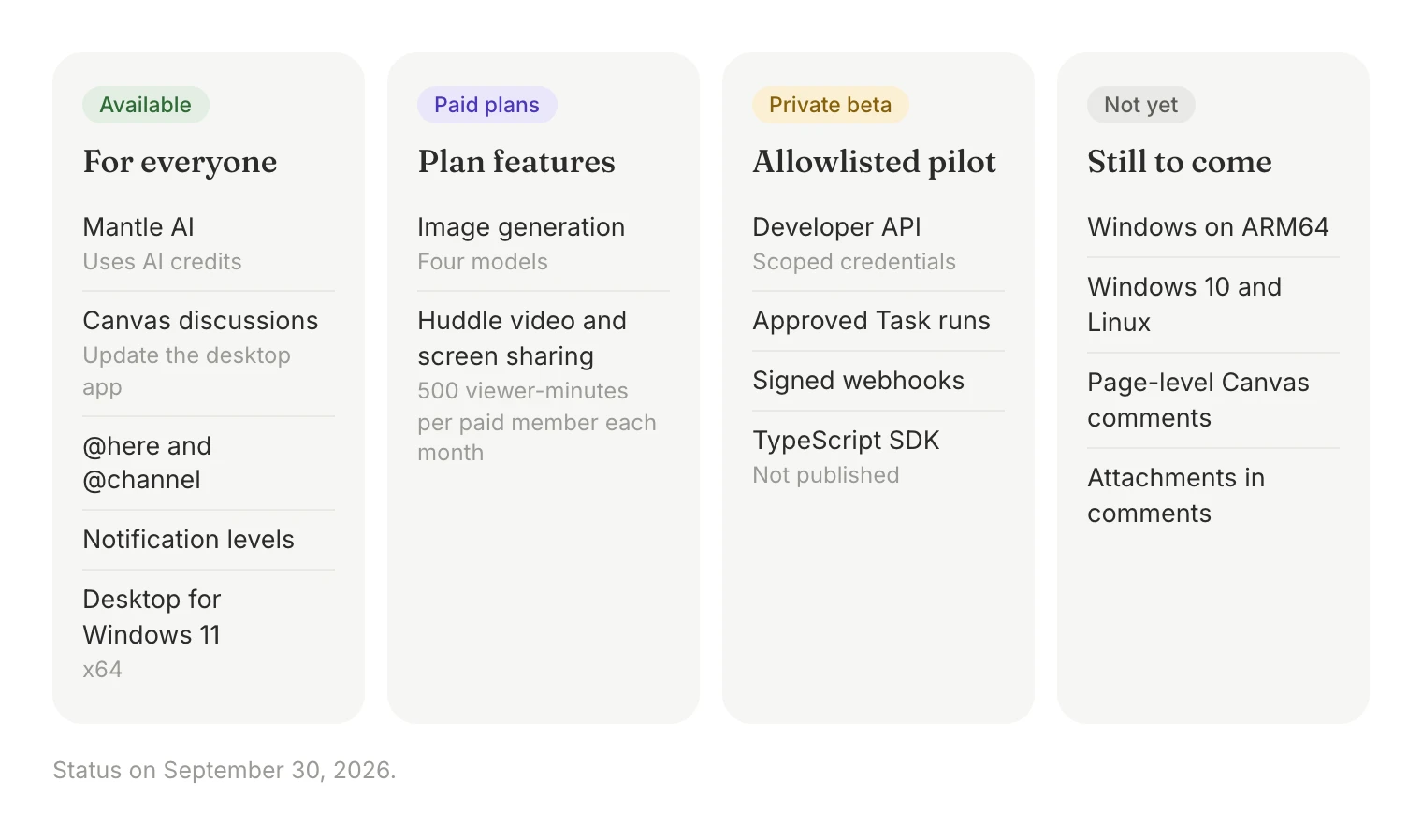
Let's walk through it.
Mantle AI Can Help Where You Are
Mantle AI is now available throughout Mantle Chat. Open it from the button near the bottom-right corner, or press ⌘J on Mac and Ctrl+J on Windows or Linux. It knows which supported page you have open, so you can ask for help without translating the interface into a separate prompt.
You can ask questions such as:
- “What is the difference between a chat and a channel?”
- “Help me create an Agent.”
- “Take me to the Launch workspace.”
- “Fill in a Task that asks my Calendar Agent for a daily briefing.”
The assistant can use bounded context from the page you are on: the recent conversation in a chat, channel, direct message, or thread; selected text or the whole document in a Canvas; or the fields on screen in your settings or a Task form. Access checks still apply. Opening Mantle AI does not let it read anything you cannot access.
Two practical details: Mantle AI requests use your AI credits like other model requests, and Mantle AI conversation history is stored in your browser, so it does not follow you to another browser or device. You can remove a conversation from that history whenever you like.
Review Changes Before They Happen
Mantle AI separates asking from applying. When it can help change something, it prepares a proposal first: text in a conversation composer, a Canvas rewrite, Task fields, or a workspace action such as creating a folder. Navigation works the same way. Mantle AI offers a button, and nothing moves until you click it.
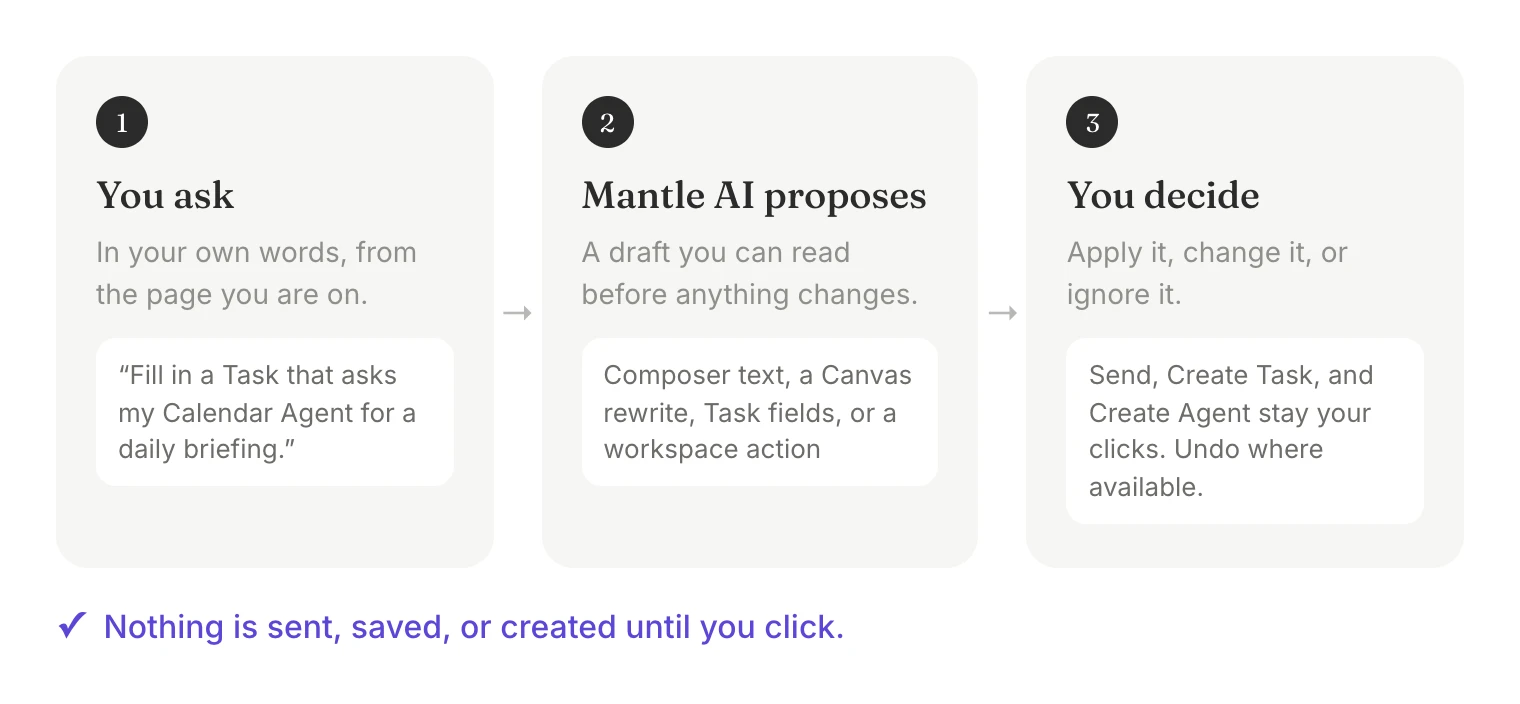
This review step matters. Assistance should reduce interface work without hiding what will happen next.
Build Agents and Tasks With Less Blank-Page Work
Creating an Agent or Task often starts with an idea rather than a structured form. On the Agent form, describe the role in your own words or start from an example, and Mantle AI prepares the name, description, and instructions for you to review. If you ask how to create an Agent from elsewhere in the app, it can open the Agent form without losing the conversation or your unsent text. Nothing is saved until you select Create Agent, or Save changes for an existing Agent.
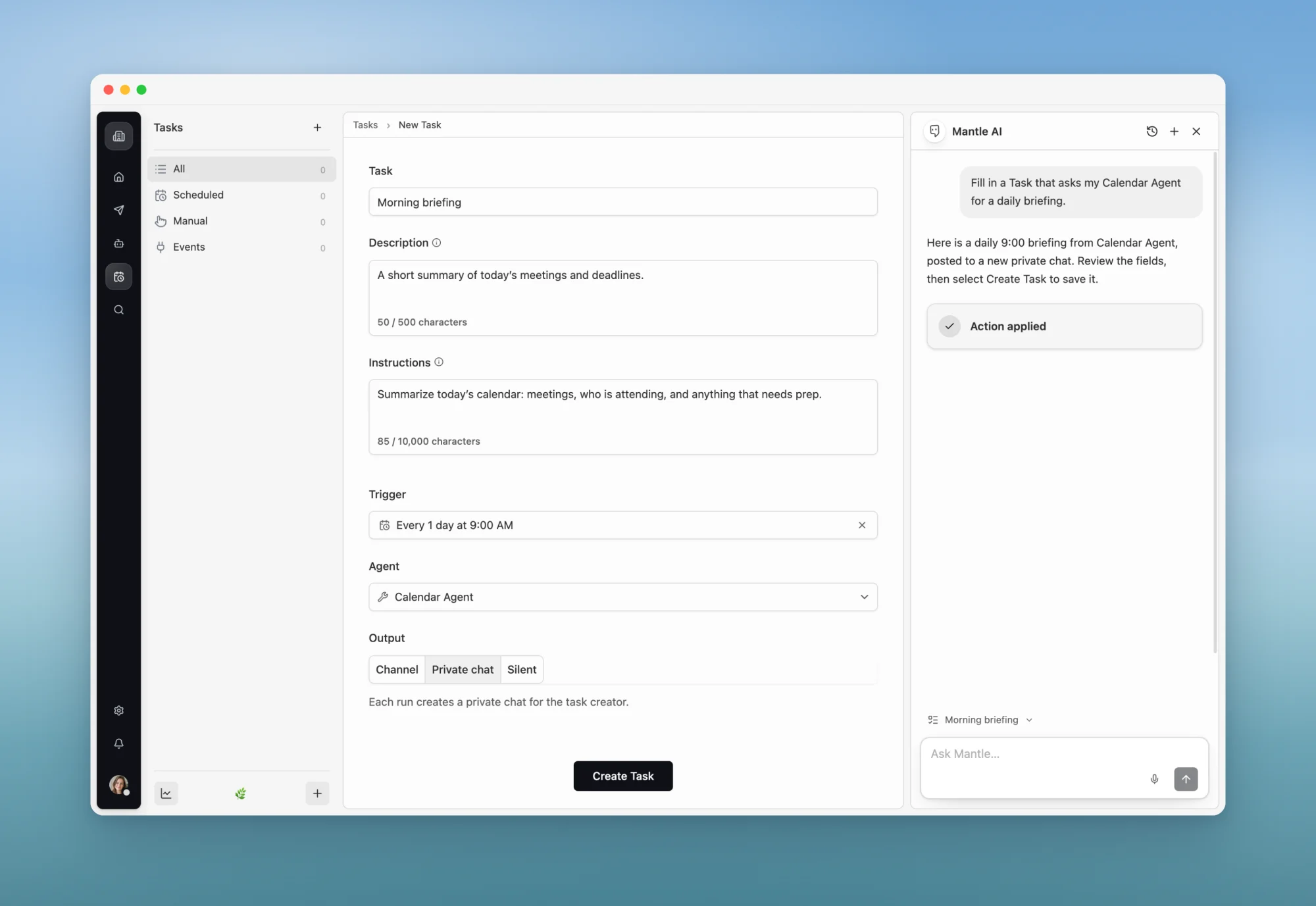
On a new Task, it can prepare the name, description, instructions, Agent, trigger, schedule, and output. If some information is missing, it fills the known fields first and asks for the rest. Applying the draft does not create or run the Task — you review the form and select Create Task yourself.
Answers With Sources From Mantle's Guides
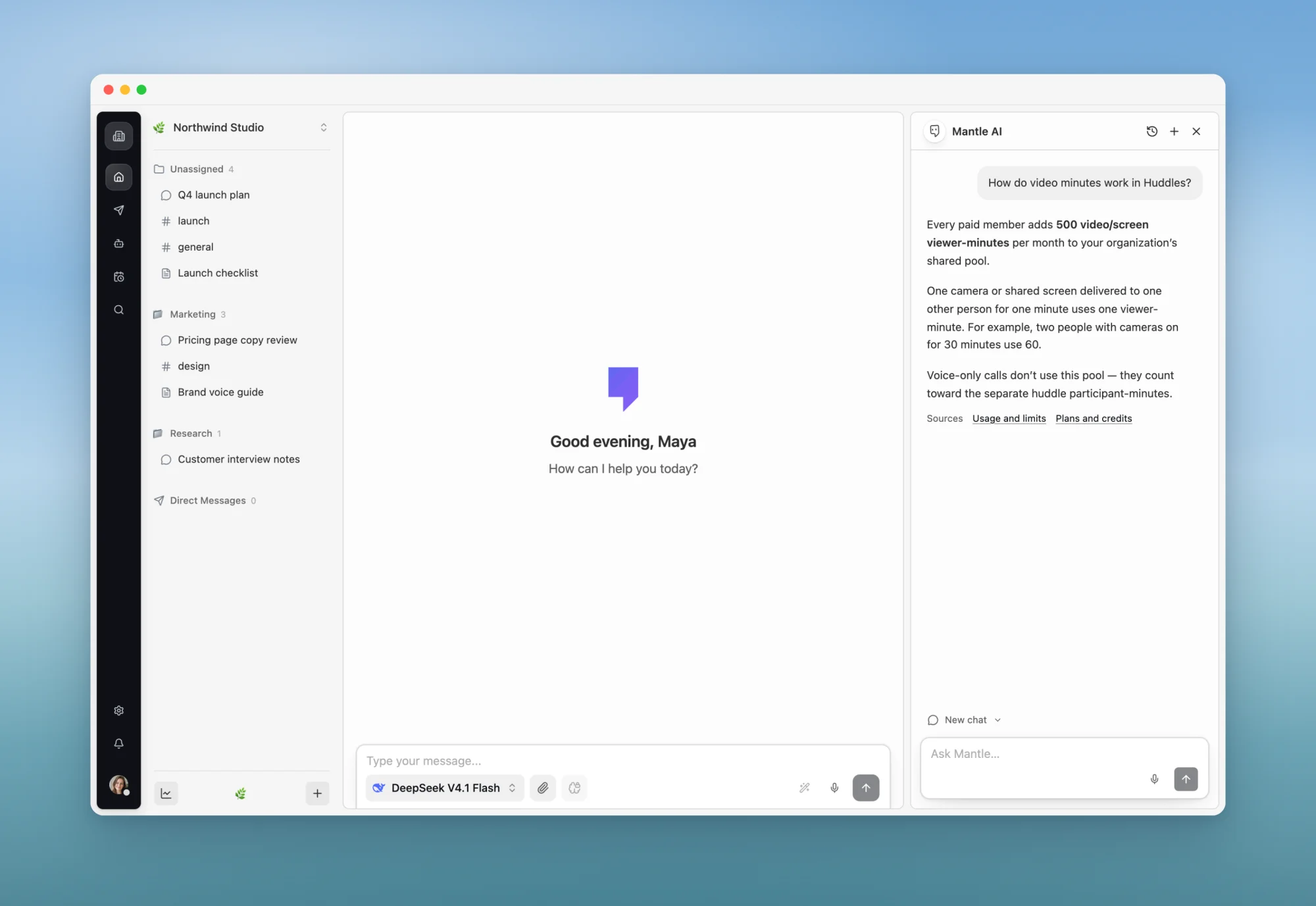
For product questions, Mantle AI retrieves up to three relevant pages from the public Mantle documentation and lists them under Sources. It is instructed to say when those guides do not support an answer instead of filling the gap with a guess. Like any model, it can still get something wrong, which is why the sources sit right under the answer. New guide pages become available to Mantle AI a few minutes after they are published.
We also gave Mantle AI a little more personality. In Settings → Preferences, you can choose where its character sits and pick one of seven skins. The default, White Minimal, stays at rest. The character reacts to activity such as finished replies, notifications, and incoming Huddles, and its motion stops when reduced motion is on.
Generate and Edit Images in AI Chats
Paid plans now have a dedicated image-generation option in the model picker. The Free plan does not include image generation yet.
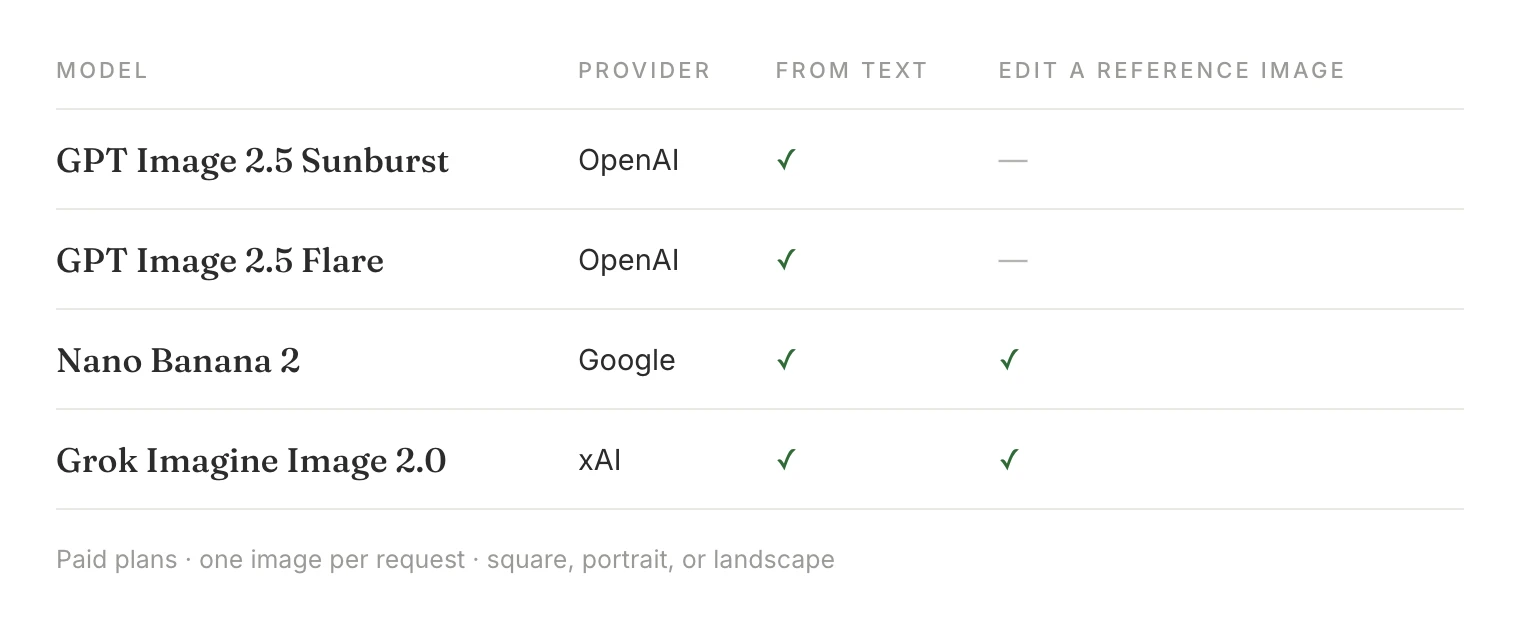
Choose a model, describe what you want, and pick a square, portrait, or landscape format. Each request produces one image, saved in the conversation with the name of the model that created it. Nano Banana 2 and Grok Imagine Image 2.0 can also work from one reference image: one you attach, or the previous image in the conversation. Follow-ups such as “now make the sky darker” include recent conversation context. The picker's cost indicator shows how the models' credit costs compare.
Before generation begins, Mantle holds a credit ceiling for the request. The final charge is based on the usage the provider reports, and stopping a request before it publishes a result releases the hold. Completed images and stopped states survive a reload. Refreshing while an image is still generating can interrupt that request, and Mantle does not resend it automatically.
Generated images are stored as private attachments. Previewing or downloading them requires authorized access, and an image does not become a public file simply because it appears in a conversation.
Canvas Discussions Stay Beside the Work
Canvases became collaborative documents in July. In September, the conversation around a Canvas moved into the document itself. Select text to start a comment or add a reaction, and the discussion stays anchored to that passage, so nobody has to paste a quote into another chat and explain where it came from.

Canvas discussions now support:
- Replies and mentions: Continue the discussion and bring the right teammate into it.
- Model and Agent replies: Mention a model or Agent in a thread. It replies under its own name, using the selected passage and the thread, and it can read the rest of the Canvas.
- Reactions: Show agreement without adding another reply, and see who reacted.
- Resolve and reopen: Close a finished discussion without losing its history.
- Follow or mute replies: Choose whether new replies in a discussion notify you.
- Links to a discussion: Copy a link that opens the Canvas at a specific thread or comment.
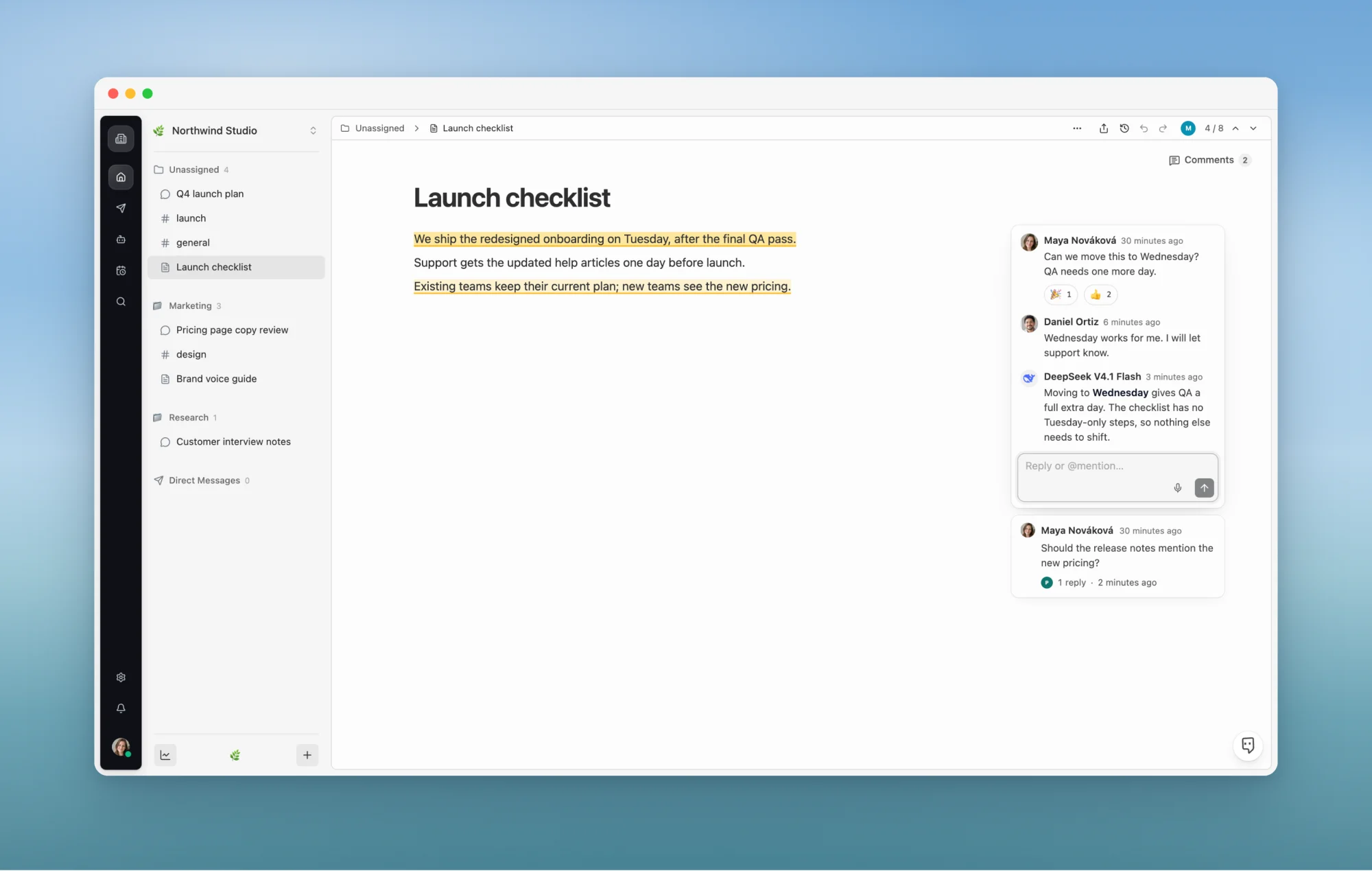
On wider screens, discussions sit in a margin beside the document. On a phone, they move into a sheet with Open, Reactions, and Resolved views. If commented text is deleted, its discussion is kept under “Text removed from the canvas”, and archived Canvases show discussions as read-only. The editor also gained a block handle with drag and drop, nested to-do lists, keyboard block movement (Alt+↑ and Alt+↓, or ⌥↑ and ⌥↓ on Mac), and new typography.
A few limits remain: comments attach to text rather than to the whole page, comments cannot include attachments yet, and an AI reply cannot read other discussion threads. In the desktop app, update to the latest version. Older desktop versions use the previous editor, and editing commented text there can detach a comment from its passage.
Huddles Add Video and Screen Sharing
Huddles started as audio calls inside channels and direct messages. They now support optional cameras and screen sharing in a floating panel that stays open while you keep working in Mantle. Drag it with a mouse or trackpad, resize it from a corner, minimize it, or go fullscreen. A shared screen takes the main view with cameras underneath, and when several people share at once, you can choose which screen to watch.
Joining remains audio-only. Your camera or screen starts only after you choose the corresponding control, and screen sharing does not include system or tab audio.
Video and screen sharing use an organization-wide shared pool. Each paid member contributes 500 video/screen viewer-minutes per UTC month, and one camera or shared screen shown to one other person for one minute uses one viewer-minute. Mantle warns when the pool reaches 80% and turns off camera and screen sharing when it runs out; voice continues within the separate voice-meeting allowance. Usage is checked periodically, so a call can briefly run past the pool before video stops. There is no automatic overage charge.
AI notes remain available where the workspace and plan allow them, with a clear consent step and a recap that participants should review before treating it as a record. In the desktop apps, cameras and screen sharing require the latest desktop release.
Mentions, Notifications, and Message Editing
Several conversation features shipped early in the month and are now on in production:
@hereand@channel: In a top-level channel message,@channelnotifies the workspace's members except you, and@herenotifies only those currently online. Mantle asks you to confirm before sending one. There is no@everyone.- Notification levels for each channel, chat, and Canvas: Choose Everything, Mentions, or Muted, including temporary mutes. Muted items keep their unread state without alerting you, and a thread you explicitly follow keeps its own setting.
- Rich message links: External links show the site's icon, fetched through Mantle rather than by your browser contacting each site. Links to Mantle pages appear as titled pills that open inside the app.
- Editing in the composer: Editing a message now happens in the main composer, and your unsent draft comes back when you finish. You can replace attachments when editing chat, channel, and direct messages, though not yet thread replies. We also fixed a failure where editing a message and regenerating the reply could show an error instead of a new answer.
- Project knowledge in replies: Project knowledge and workspace message search are now separate settings, and replies that use project knowledge show which files and passages they drew from.
A More Current Model Catalog
Mantle Chat now lists 28 hosted text models across eight providers. The model picker remains the source of truth because provider availability changes, but three updates stand out this month.
Gemini 3.8 Flash
Gemini 3.8 Flash joined the Google lineup with a context window of about one million tokens. We also changed how Mantle handles long-form requests: models are instructed to follow your requested length and format and, when you ask for a complete piece, to write the work itself rather than a summary, outline, or shortened sample.
Long output limits are still ceilings rather than promises. In our testing, models sometimes finished early, missed a requested length, or lost track of details in long fiction. If you stop a reply, it now stays marked as stopped after a reload.
Early in the month, Claude Sonnet 4.5, GPT-4.1, and Gemini 2.5 Pro returned to the picker. Gemini 2.5 Pro has since been retired again because our production route could not serve it reliably; Claude Sonnet 4.5 and GPT-4.1 remain available. Retiring a model does not rewrite old conversations or usage records.
DeepSeek V4.1 Flash
The existing DeepSeek Flash option now uses DeepSeek V4.1 Flash, accepts image input, and has a one-million-token context window. It remains the default for new chats. Saved conversations, Agents, and preferences keep working because they refer to Mantle's stable model identity rather than a specific provider version.
A Focused Model for Folder Decisions
Folder suggestions now use Jev, a focused decision model from TypeSafe, to choose whether a conversation belongs in one of your existing folders. Jev receives the start of the chat's title and content and your folder names, but not your account, workspace, chat, or folder identifiers. If no folder fits, DeepSeek can still suggest a name for a new one, and if Jev is unavailable or returns an invalid answer, Mantle falls back to the previous DeepSeek flow.
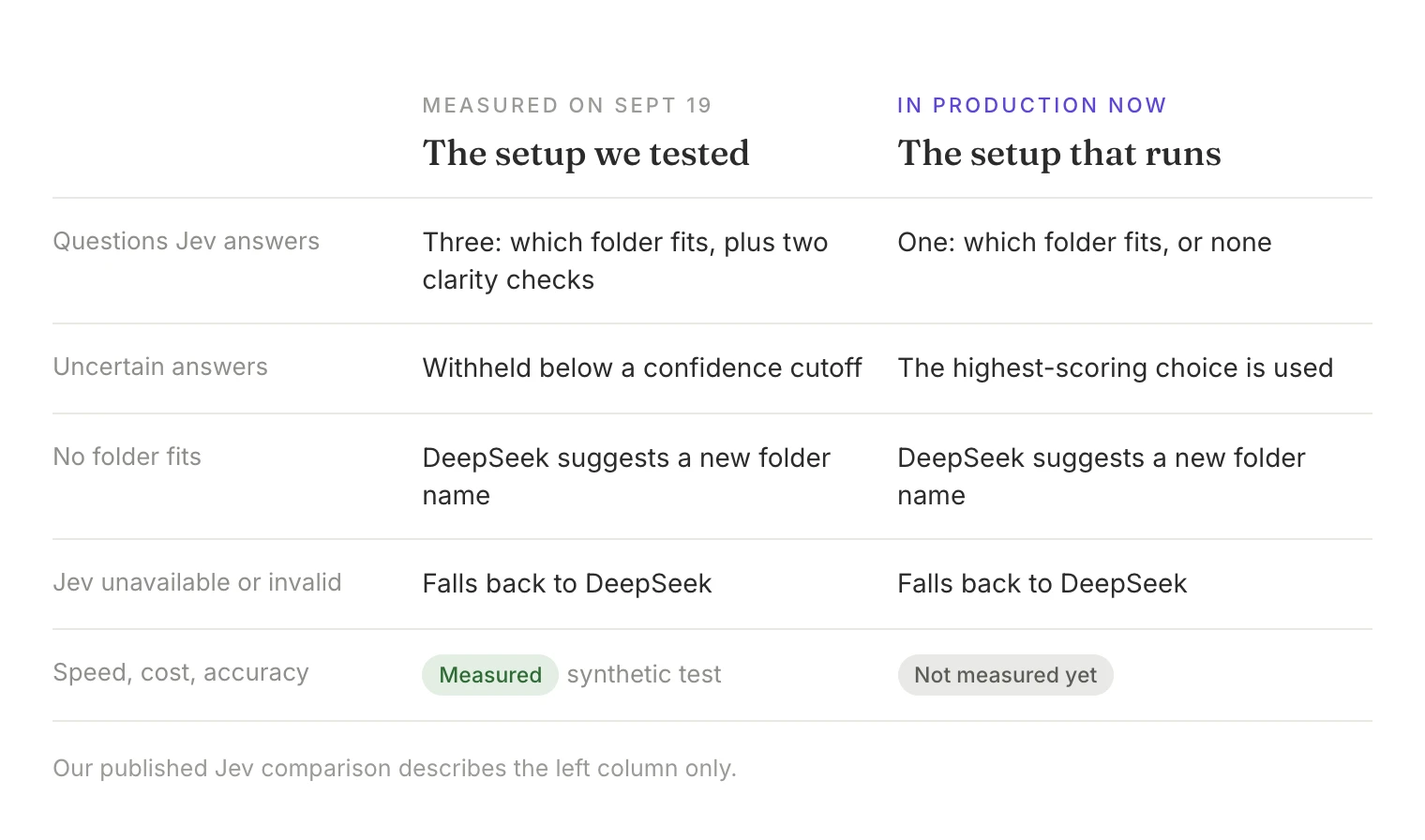
We published a synthetic comparison of the earlier setup. The version in production is simpler, and we have not measured its speed, cost, or accuracy yet, so the published results describe the earlier setup only. Read how we tested the earlier Jev setup →
Loading, Drafts, and Recovery
September included a broad pass over loading and recovery problems. Most of these changes fix specific failures rather than support one overall speed claim, so here is what changed:
- Saved chats start loading earlier: Opening a saved conversation no longer waits for every workspace to load.
- Local data setup in the background: The web and Desktop apps prepare their local database in a background worker, so that setup no longer blocks the interface.
- Drafts that stay put: Drafts are saved when you switch conversations or close the app, survive restarting Desktop, and are kept per account.
- Offline recovery: A conversation that fails to open while you are offline now says it is a connection problem, offers Try again, and loads automatically when the connection returns.
- Workspace switching: If cached workspace data is slow to appear, Mantle starts the network request instead of leaving the list empty. In our small samples, first-visit load times stayed about the same.
- Overlapping workspace reads: The server now reads a workspace's chats, channels, Canvases, and folders two at a time instead of one after another. In a small development comparison, the median time for those reads fell from 153.5 ms to 78.9 ms. That sample does not show a change in overall page-load time.
- Steadier controls: Workspace selectors, custom workspace emoji, message-tracker previews, and tooltips no longer flicker or lag behind quick pointer movement in the cases we reproduced.
- Sign-in page: The login page now shows only Google sign-in, matching the sign-in methods currently enabled.
There is more work to do. Very long histories and some panel transitions can still pause, and Markdown sometimes appears with a short delay. We are continuing to measure these with real pointer behavior and packaged Desktop builds rather than declaring the performance work finished.
Workspace and Integration Details
Ownership transfer now uses a searchable member list and a confirm button that names the new owner. If you are the only organization member, the same screen opens the invitation dialog instead. Deletion dialogs are centered wherever you open them and show the exact confirmation phrase with a copy button. You can also own up to 10 free organizations, up from one; paid organizations, active trials, and your personal organization do not count toward that limit. We also fixed two problems that could make account deletion fail, or report an error after it had succeeded.
If Notion needs you to authorize Mantle again, the Agent tool card now shows Reconnect and Retry instead of reporting that no tools were found.
Mantle's MCP server, which lets connected apps such as Cursor work with your workspace, gained tools for folders, chats, channels, and Canvases, bounded content reads, plain-text channel posts, and saved-Agent calls. Deletions and workspace setting changes require the item's current version, and Mantle relies on your connected app to ask you to confirm them. A personal connection can now call saved Agents in your own personal workspace; team workspaces still require explicit organization permissions for the connection.
Windows Desktop and the Developer Beta
Mantle Chat Desktop Is Available for Windows 11
Mantle Chat Desktop is now publicly available for Windows 11 on x64. The first signed Windows release, 0.1.19, went live on September 15, and 0.1.22 followed on September 29. You can download it from the Downloads page. The app installs for your user account without administrator rights and includes built-in updates. Windows builds are signed by Mantle Chat through Microsoft Artifact Signing, and each one passes installation, in-app update, and corrupted-download checks before it reaches the Downloads page.
Windows on ARM64, Windows 10, and Linux are not supported yet. We are continuing to test on a wider range of Windows 11 PCs, so if something looks off on yours, please tell us.
The Developer API Remains a Private Beta
The developer platform moved forward, but it is not a public launch. An allowlisted pilot workspace can use scoped developer credentials, approved Task runs, private single-turn requests to a saved Agent, signed webhooks, and a TypeScript SDK. The SDK has not been published, and this is not a general-purpose public prompting API.
Those boundaries matter. A monthly update should show where the product is going without presenting a controlled pilot as something every account can use today.
Thank You
Thank you to everyone who tried Mantle AI in a real workflow, tested an image model, moved a Canvas discussion out of a separate chat, installed the Windows app, or reported a moment where the app felt slow or uncertain.
September's most visible work spans assistants, images, comments, calls, and a new desktop platform. The quieter work spans drafts, permissions, recovery, notifications, model identity, private media, and release checks. Both kinds of work are necessary if Mantle is going to help teams move from a question to something they can review, share, and keep.
Keep sending us the specific moments that help — and the ones that get in the way.
Connect With Us
Have questions or feedback? We'd love to hear from you:
- LinkedIn: linkedin.com/company/mantlechat
- Product Hunt: producthunt.com/products/mantle
- Peerlist: peerlist.io/katja/project/mantle-chat
- X/Twitter: x.com/mantlechat
- Instagram: instagram.com/mantle.chat
- YouTube: youtube.com/@mantlechat
- Discord: discord.gg/STzq94kdDC
Let's build the future of AI collaboration together. 🚀
— The Mantle Chat Team