

monthly-update · ai-agents · integrations · custom-emoji · gpt-5 · credit-system · homepage-redesign · collaboration
Mantle Chat Monthly Update: March 2026
By Mantle Chat Team · Apr 4, 2026 · 10 min read
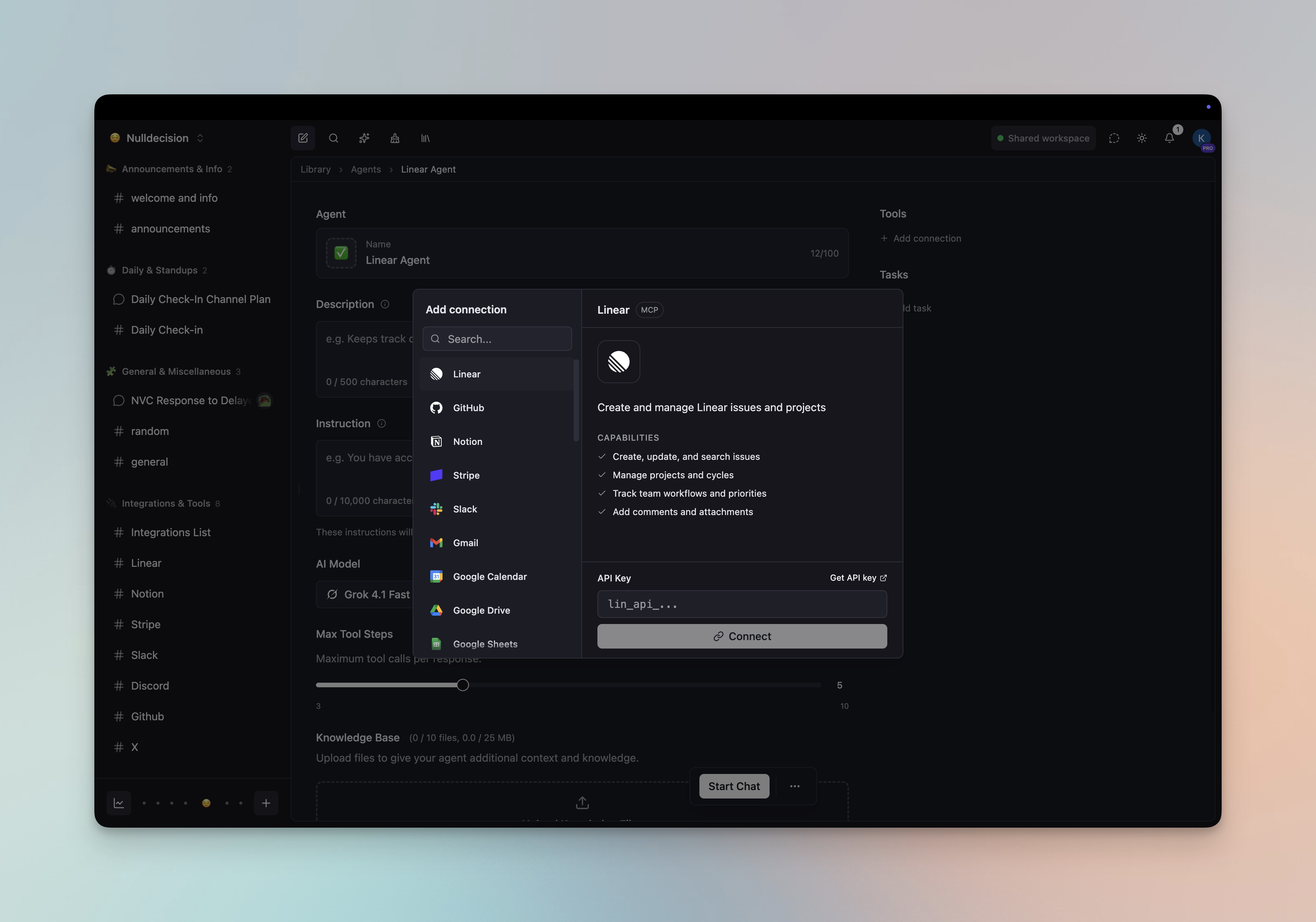
March 2026 was a landmark month for Mantle Chat. AI Agents just got seriously powerful — with 30+ software integrations, autonomous tasks, and workflow triggers. We also shipped custom emoji, the GPT-5.4 model family, and improved Notion integration. Free users can now invite team members to their workspaces. And we redesigned the credit system — moving from a fixed message count to 5-hour time windows, making it more generous and flexible. Plus, a completely new homepage with an interactive demo showcasing the capabilities available in Mantle Chat. We also redesigned the navigation and built a new model selector to make it easier to explore everything Mantle has to offer. That's a lot — let's break it all down.
AI Agents: 30+ Integrations, Autonomous Tasks & Workflows
This is the biggest update of the month — and it fundamentally changes what's possible with Mantle Chat agents. They're no longer just conversational — they can now connect to your software stack, run on schedules, respond to external events, and chain together into multi-agent pipelines.
30+ Software Integrations
Your agents can now connect to over 30 external tools and services through managed integrations. From project management to CRMs, from communication platforms to developer tools — agents can read, write, and act across your entire software stack using MCP tools.
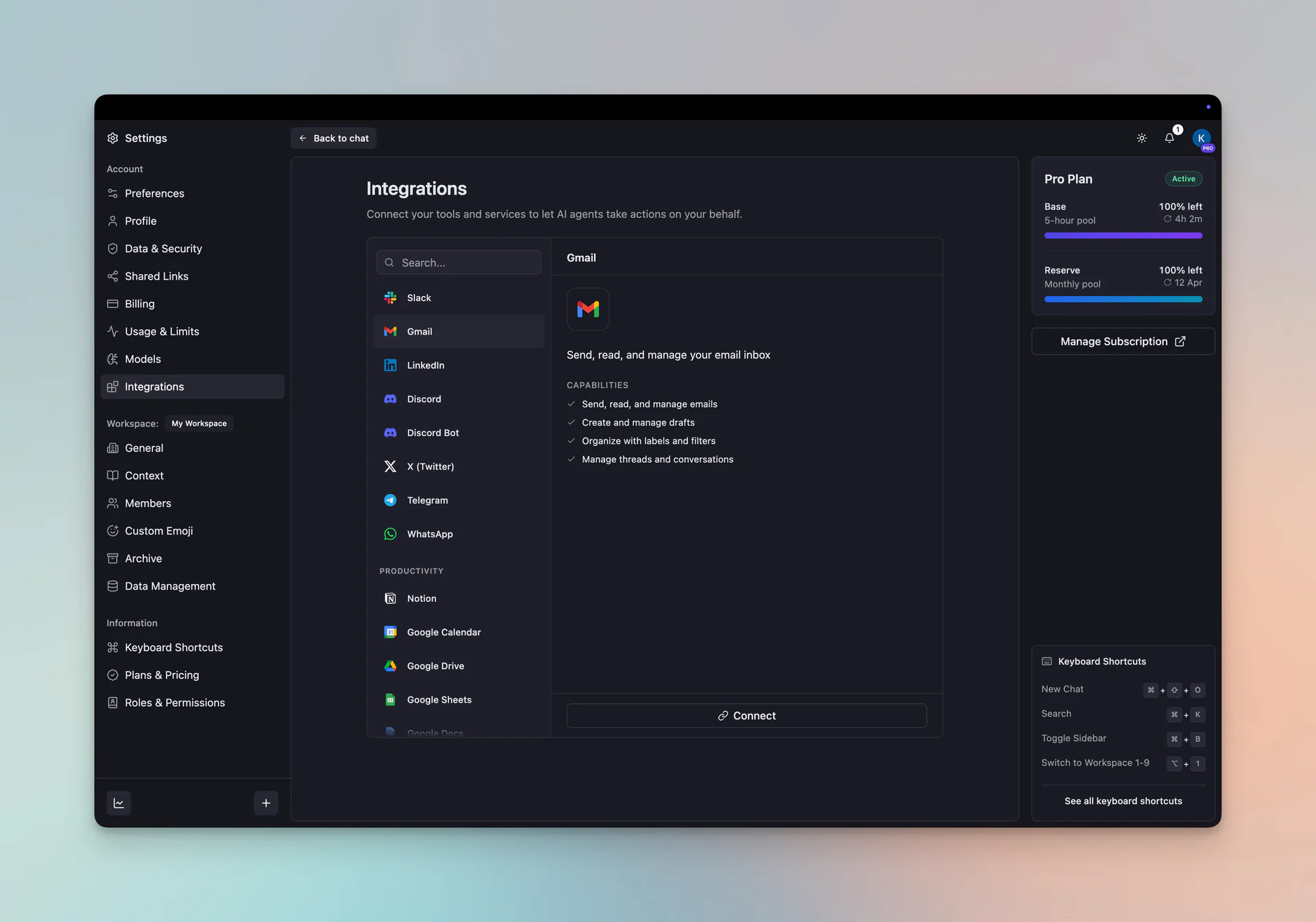
Here's what that looks like in practice:
- 📧 Gmail: Let your agent triage your inbox — it can read unread emails, summarize what needs attention, and draft replies on your behalf. "Summarize my unread emails from today and draft replies to anything urgent."
- 📋 Linear: Turn conversations into action. Your agent can create issues, update statuses, assign teammates, and keep your project board in sync without leaving the chat. "Create a bug ticket for the login issue we just discussed, assign it to me, and set priority to high."
- 📅 Google Calendar: Let your agent handle scheduling — it can check availability, find open slots, and coordinate meetings across your team. "Check my schedule for tomorrow and find a 30-minute slot for a design review with the team."
- 🎨 Figma: Keep up with design feedback without opening Figma. Your agent can pull comments, extract design context, and summarize what your team is asking for. "Pull the latest comments from the homepage redesign file and summarize what the team is asking for."
Connecting an integration takes a few clicks — authorize via OAuth or add an API key, and your agent is ready to use it.
Autonomous Tasks
Every agent now has a Tasks tab where you define autonomous work. A task is a self-contained automation unit — it defines what the agent does (with task-specific instructions), where the output goes, and when it runs via a trigger.
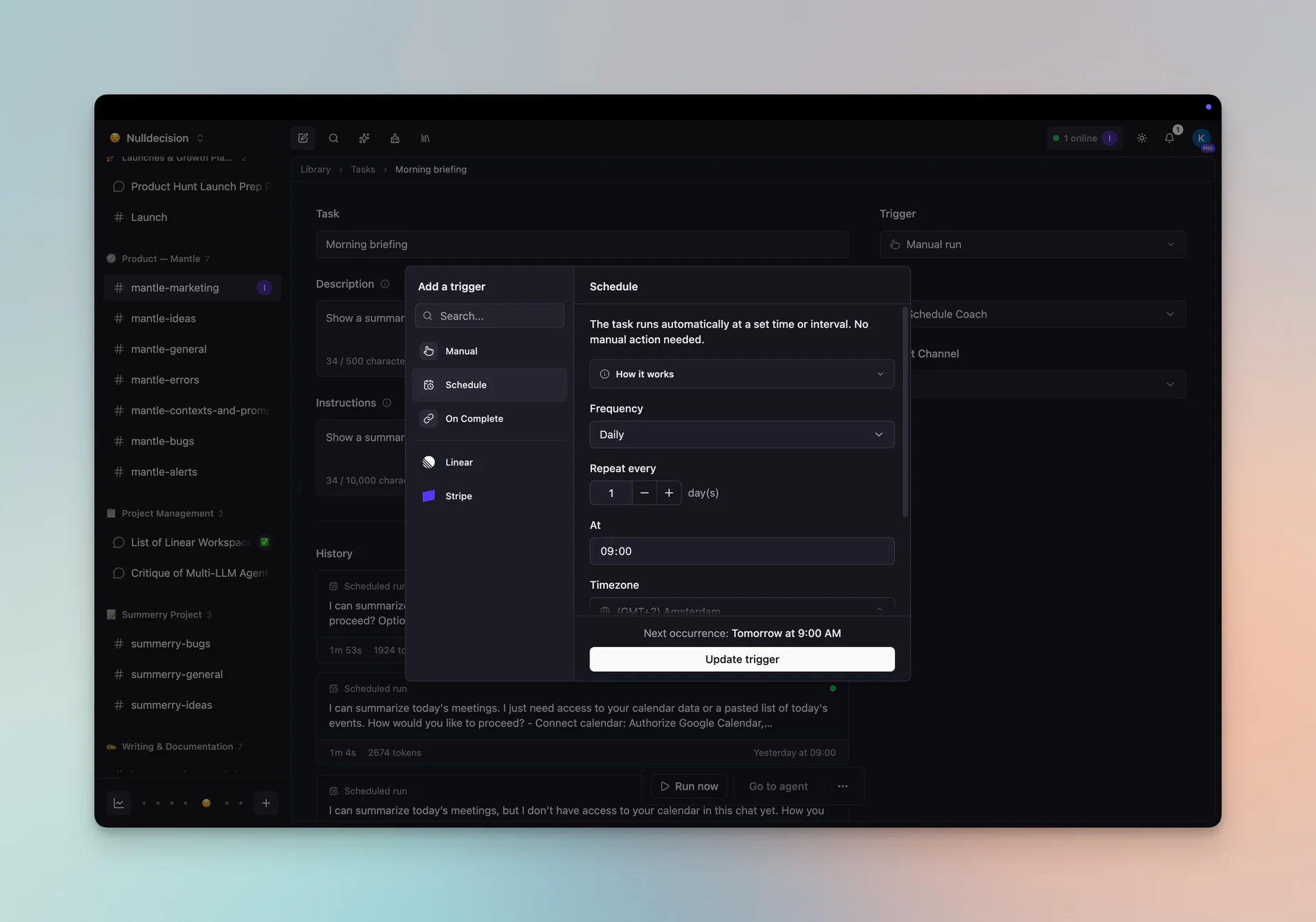
Triggers — choose how your task starts:
- ⚡ Manually: Run the task whenever you want with a button press
- 🗓️ Schedule: Run on a recurring schedule — every few minutes, hourly, daily, or weekly
- 🔗 Linear webhook: Fire when a Linear event occurs — issue created, status changed, comment added
- 💳 Stripe webhook: Fire on Stripe events — payment succeeded, subscription created, invoice paid
- 🔄 When a task completes: Chain tasks together — run this task after another one finishes
Output: Every task posts its result to a channel of your choice — pick any workspace channel and your agent's responses show up there automatically.
Task Chains: Multi-Agent Pipelines
This is where it gets really powerful. When a task completes, it can trigger another task — which can trigger another, forming multi-step agent pipelines. Chains can span across multiple agents, each with different expertise, tools, and instructions.
Example: a research-to-publish pipeline
A "Researcher" agent collects data on a schedule → its completion triggers an "Editor" agent that summarizes and formats → which triggers a "Publisher" agent that posts to your #releases channel. Every step reasons independently, uses its own tools, and builds on the previous step's output.
Custom Emoji
Express yourself your way! Mantle Chat now supports custom emoji — upload your own images and use them everywhere.
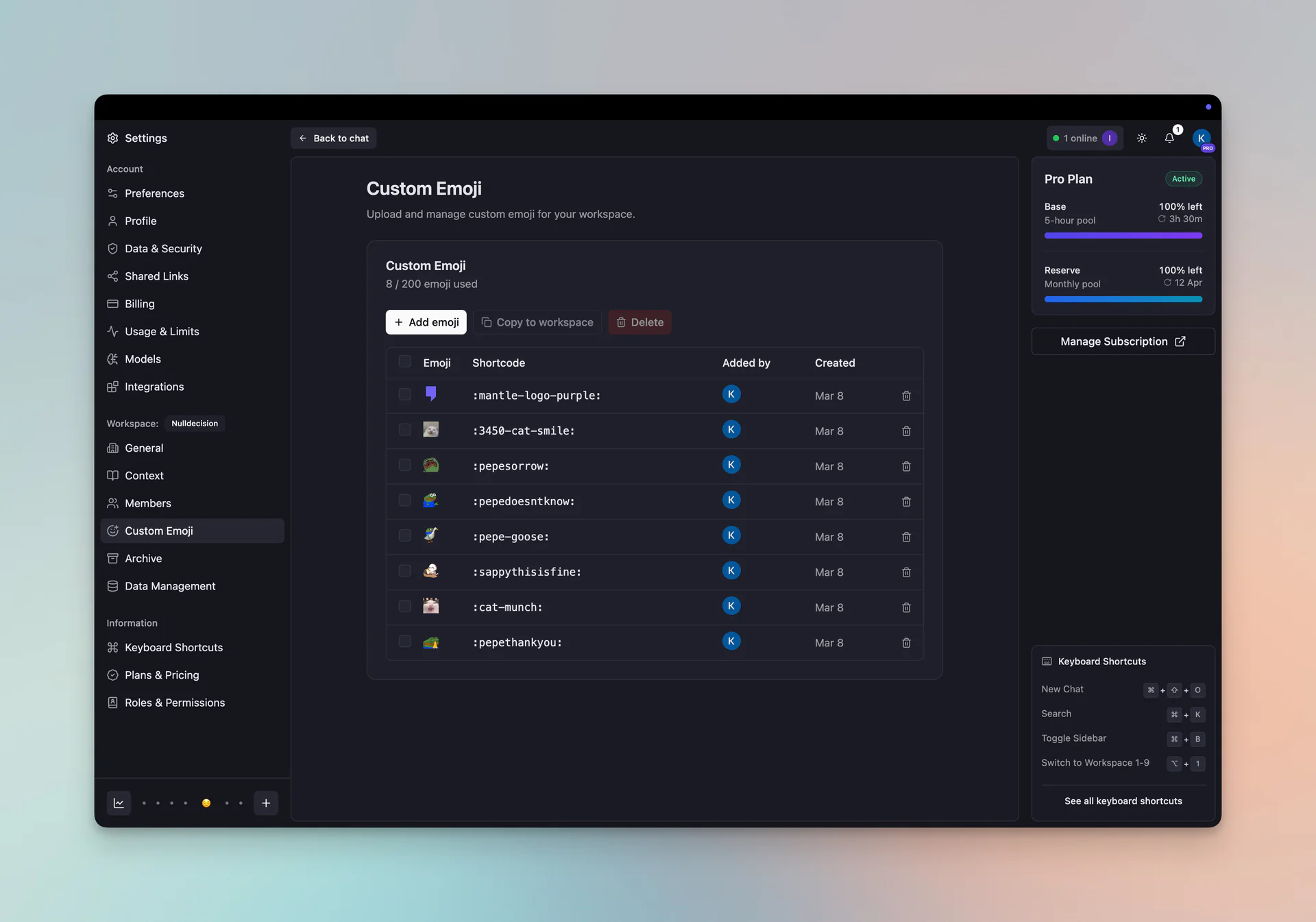
Here's what's included:
- 🎨 Upload custom emoji: Add your team's inside jokes, brand icons, or anything else as custom emoji
- 💬 Use everywhere: Custom emoji work in messages, reactions, agent cards, threads, workspace items, and mention dropdowns
- 🔒 Workspace-scoped: Each workspace gets its own emoji library with permission controls
GPT-5.4 Model Family
March brought three new models from OpenAI's latest generation — GPT-5.4, GPT-5.4 Mini, and GPT-5.4 Nano.
What's new:
- 🎯 GPT-5.4: The flagship model with top-tier reasoning and extended context
- ⚡ GPT-5.4 Mini: A faster, lighter option that still packs a punch
- 🪶 GPT-5.4 Nano: The most efficient option — great for quick tasks and high-volume use
- 🔍 Full feature support: All three support web search and extended thinking
With GPT-5.4, Mantle Chat now offers access to 25+ AI models across OpenAI, Anthropic, Google, xAI, and DeepSeek — the broadest model selection of any AI chat platform.
New Model Selector
With 25+ models to choose from, we needed a better way to browse and pick the right one. The model selector has been completely rebuilt from scratch.
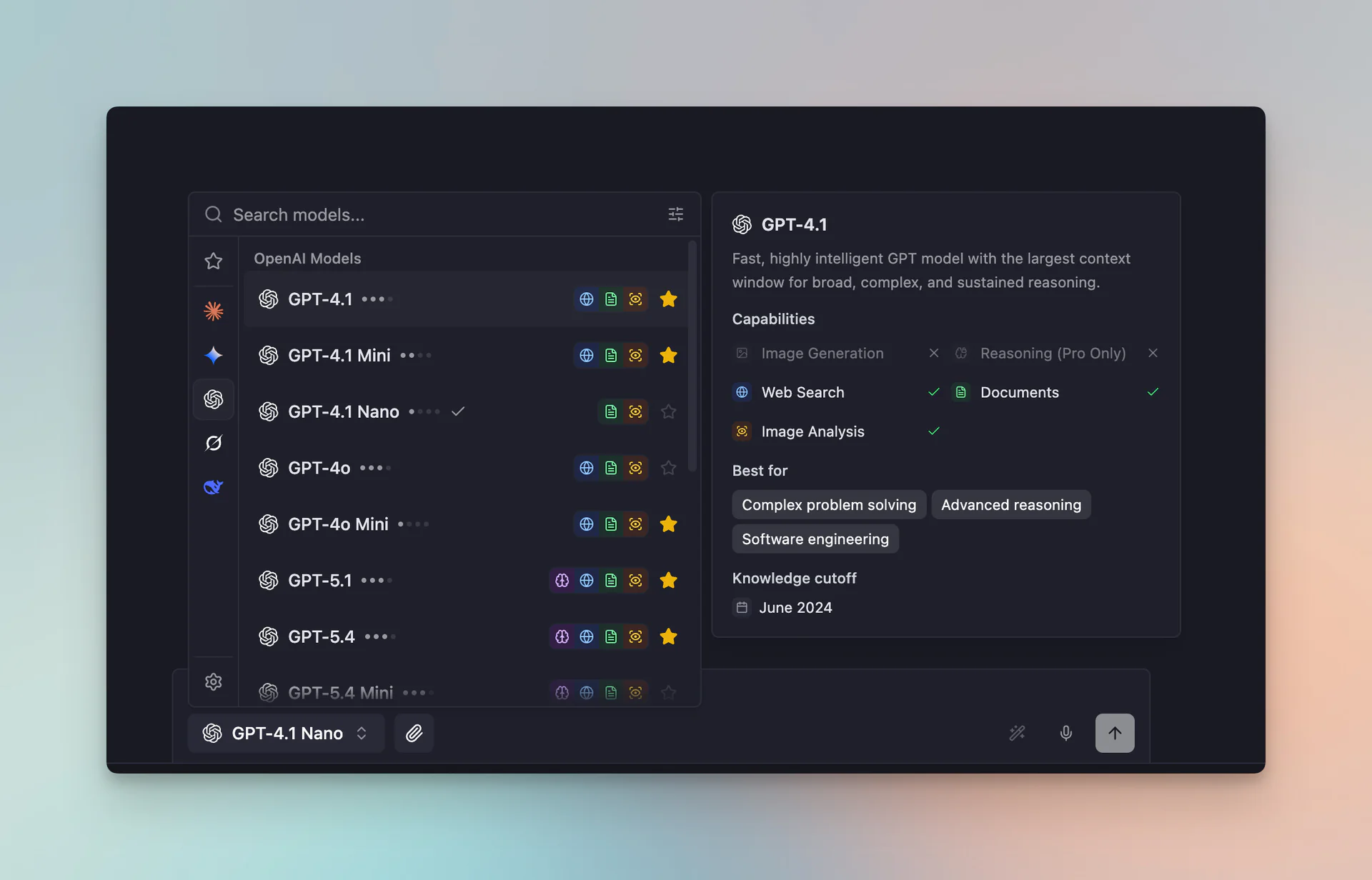
- 🏢 Provider sidebar: Filter by provider — Anthropic, OpenAI, Google, xAI, DeepSeek — with a single click on their logo
- ⭐ Starred models: Star your favorites and toggle between starred-only and all models
- 🔍 Search: Quickly find any model by name
- 🎛️ Capability filters: Filter by what you need — reasoning, web search, image analysis, or document support
- 💰 Cost filters: Filter by cost tier (low cost, moderate, high, very high) to find models that match your budget
- ⚙️ Configure models: Jump straight to model settings to customize your lineup
No more scrolling through a flat list. Find the right model for the task in seconds.
Free Workspace Collaboration
Big news — you no longer need a Pro subscription to invite team members. Every Mantle Chat user can now invite others to their workspace and collaborate freely.
What's changed:
- ✅ Invite members for free: Add teammates to any workspace without upgrading
- 👑 Promote to admin: Workspace owners can promote members to admin on any plan
- 🧹 Cleaner UI: The members page has been refactored with a fresh design and clearer role management
- 📋 Updated permissions: Roles and permissions documentation updated to reflect the new open model
We believe collaboration should be accessible to everyone. Pro still unlocks premium models and higher usage limits, but the core team experience is now free for all.
Redesigned Credit System
We've completely redesigned how usage limits work. The old system gave you a fixed number of messages per month — simple, but rigid. The new system replaces that with time-based credit windows, giving you more flexibility to use any model you want and manage your own limits.
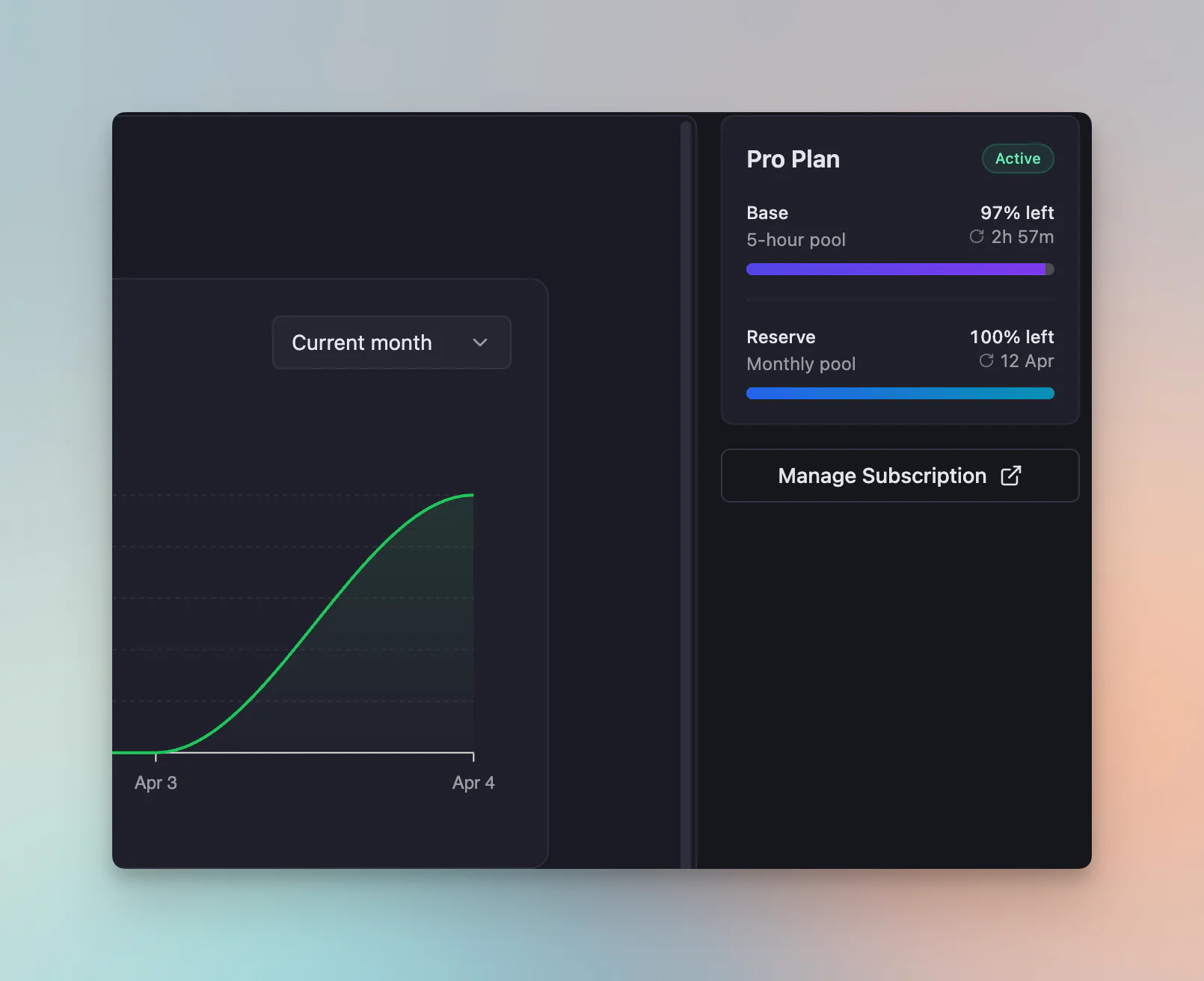
Two Buckets: Base + Reserve
Your usage is split across two independent credit pools:
- ⚡ Base — a smaller pool that refills every 5 hours. This is your everyday allowance, and it always comes back — you're never more than 5 hours from being able to use Mantle Chat again
- 📦 Reserve — a larger monthly pool that kicks in when Base runs out. Reserve refills on your billing date
Base always refills independently, even if your Reserve is empty. This means you always have access within a few hours — no waiting weeks for a monthly reset.
Model Multipliers
Not all models cost the same. Cheaper models like GPT-5 Nano or Gemini Flash use fewer credits per message, while powerful models like Claude Opus or GPT-5.4 use more. This means you can stretch your credits further by picking the right model for the task — use a lightweight model for quick questions, and save the heavy hitters for when you really need them.
Homepage Redesign
Mantle Chat got a major visual refresh in March. The homepage has been completely redesigned with a modern, polished look — and now includes an interactive demo so you can experience the product before signing up.
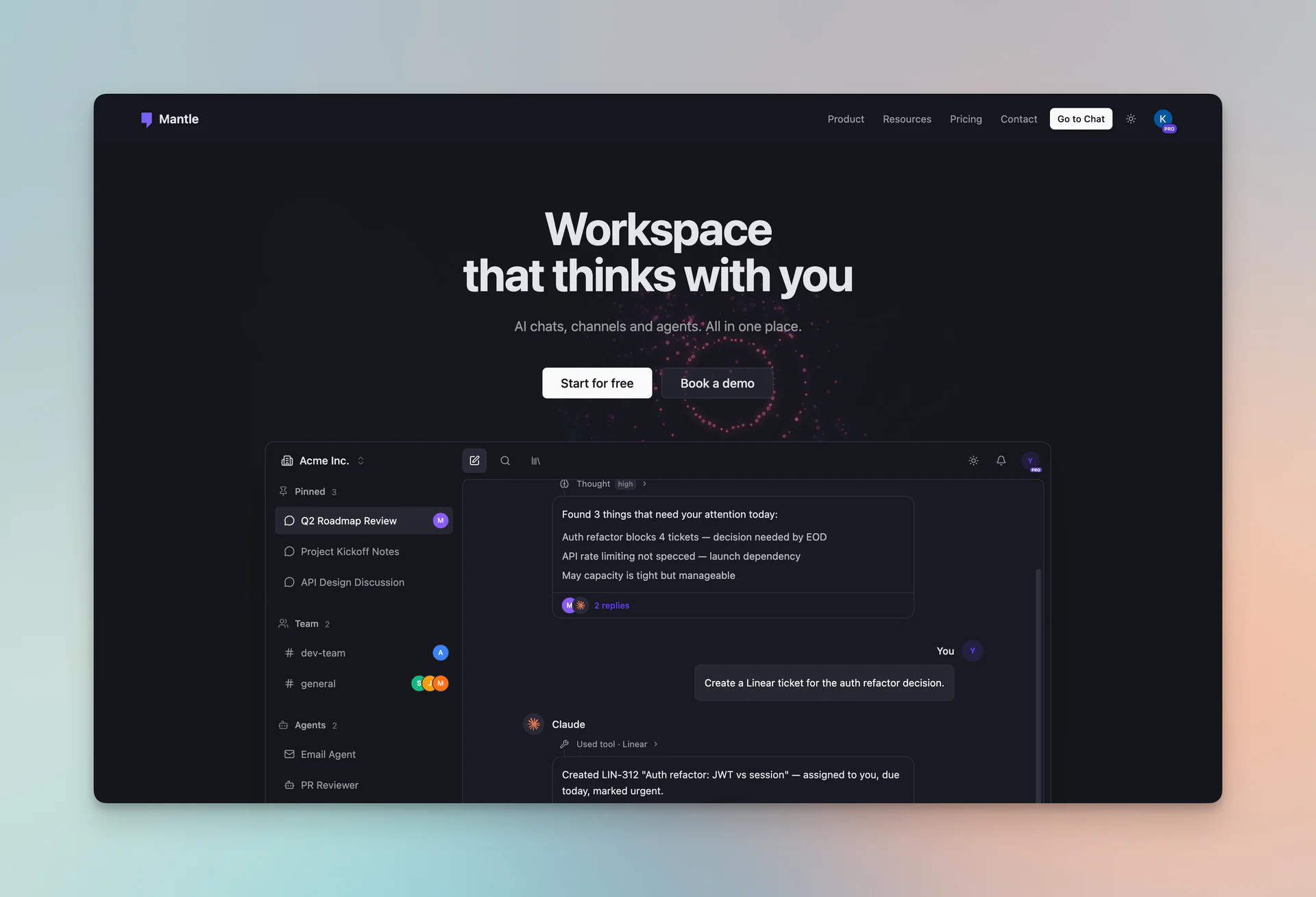
- 🖥️ Interactive demo: Explore chats, channels, and agents capabilities right from the landing page — no account needed
- 🎛️ Model selector preview: Try the new model selector with all 25+ models, filters, and provider sidebar
- 🔗 Quick links to product pages: Jump straight to dedicated pages for Chat, Channels, Agents, Tasks, and Integrations
- ✨ New animations and icons: Refreshed visuals with subtle motion effects throughout
New Navigation
The navigation has been rebuilt from scratch to help you find everything Mantle Chat has to offer.
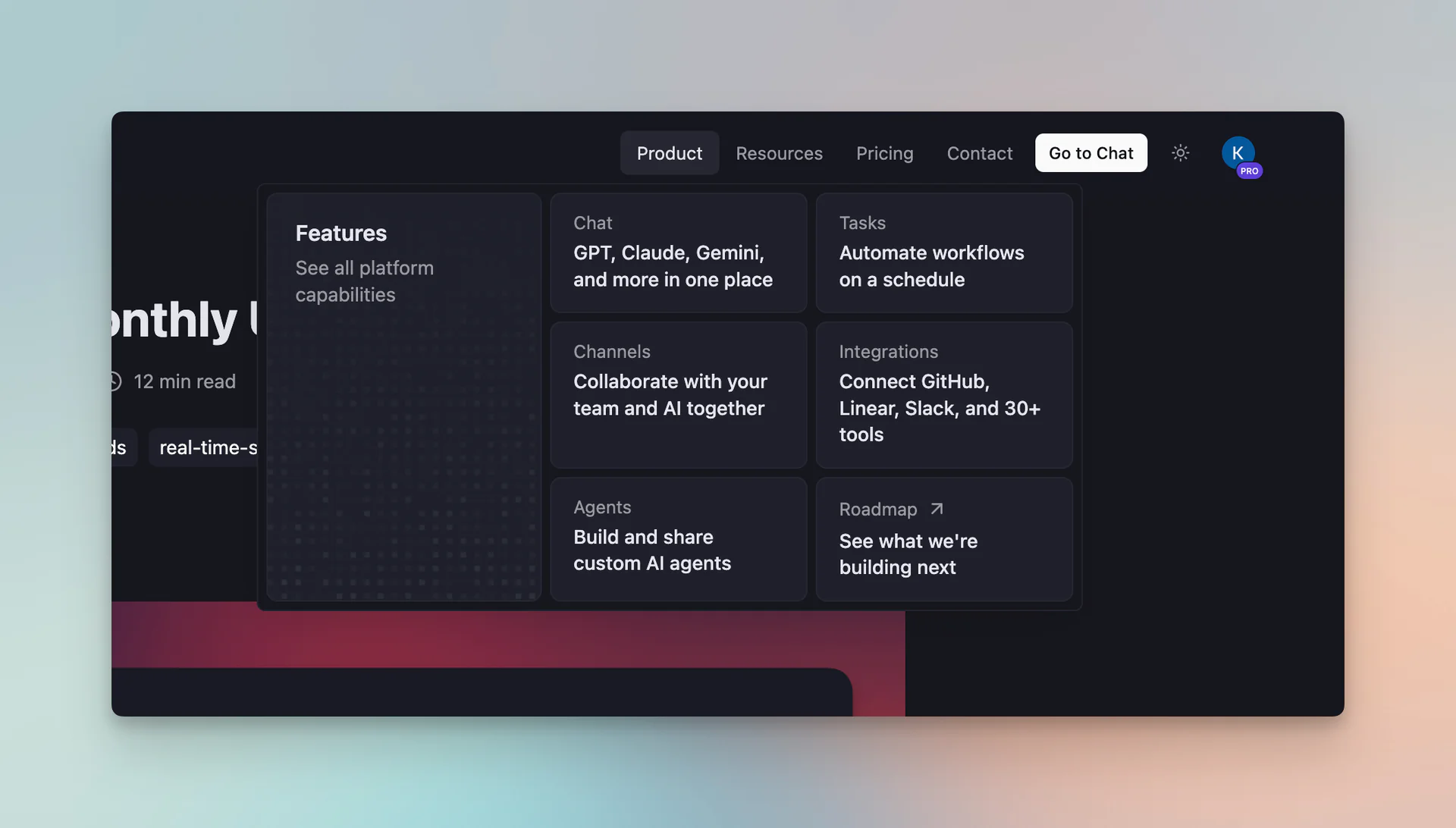
- 🧭 Product dropdown: A rich mega-menu with links to Chat, Channels, Agents, Tasks, Integrations, and our public Roadmap — each with a description so you know exactly where to go
- 📚 Resources dropdown: Quick access to the Blog, About page, Documentation, Discord community, and service Status
- 📱 Redesigned mobile menu: All the same sections, organized into clean groups with smooth transitions
Product Pages
We've also added dedicated product pages so you can explore each part of Mantle Chat in depth:
- 💬 Chat: Everything about the AI chat experience — 25+ models, web search, shared chats, writing tools, and smart organization
- 📢 Channels: Team messaging with AI built in — integrations, threads, reactions, real-time presence, and workspace roles
- 🤖 Agents: Custom AI personas for any workflow — research, writing, scheduling, coding, and more
- 📋 Tasks: Automated workflows and pipelines — morning briefings, weekly reports, PR reviews, content calendars, and support triage
- 🔌 Integrations: Connect your tools to AI — Linear, Notion, Stripe, GitHub, and more
Each page is designed to show you what's possible before you sign up — with real examples, use cases, and interactive previews.
Notion Integration
Our Notion integration got a major upgrade. You can now link your Notion workspace to Mantle Chat and receive real-time updates directly in your channels.
- 🔗 OAuth connection: Link your Notion workspace securely with a few clicks
- 📢 Channel subscriptions: Subscribe channels to Notion page updates
- 🤖 System messages: Notion events appear as system messages, keeping everyone informed
- 🧹 Clean disconnects: Removing the integration automatically cleans up subscriptions
Mobile Experience
We added a three-dots overflow menu to the mobile chat header, bringing desktop-only actions to smaller screens:
- 🤖 AI Reorganize and Auto-archive — keep your sidebar tidy from mobile
- 📚 Agents Library — browse and switch agents on the go
- 🌙 Dark mode toggle — switch themes without hunting through settings
- 🔔 Notifications — access your notification sheet directly from the header
Bug Fixes & Polish
March wasn't just about new features — we fixed several issues that improve everyday reliability:
- 🔍 GPT-5 web search + reasoning: Fixed an issue where GPT-5 models required minimum reasoning effort for web search but didn't auto-upgrade. Now the UI handles this seamlessly
- 🗑️ Persistent deleted messages: "This message was deleted" now persists after page reload instead of disappearing — proper soft-delete behavior
- 🎨 Rich text consistency: Unified link styling, underline, and strikethrough rendering across the editor, agent messages, user messages, and shared conversations
Infrastructure
- 🏎️ Blacksmith CI runners: Migrated GitHub Actions to Blacksmith runners for 2x faster builds, colocated cache, Docker layer caching, and better observability
Thank You
March was one of our biggest months yet. From autonomous AI agents with 30+ integrations to a completely redesigned homepage, every update was shaped by the feedback and support from our growing community. Thank you for being part of this journey!
Connect With Us
Have questions or feedback? We'd love to hear from you:
- 🔗 LinkedIn: linkedin.com/company/mantlechat
- 🚀 Product Hunt: producthunt.com/products/mantle
- 🐦 X/Twitter: x.com/mantlechat
- 📸 Instagram: instagram.com/mantle.chat
- 📺 YouTube: youtube.com/@mantlechat
- 💬 Discord: discord.gg/STzq94kdDC
What's Next?
April is shaping up to be exciting:
- 🤖 Improving agents: Making agents more powerful, reliable, and easier to configure
- 📋 Agent templates: Pre-built agent templates to help you get started faster
- 🏢 Organizations: Adding organizations to the architecture taxonomy for better team structure
- 📧 Emails: Transactional and notification emails to keep your team informed
- 💬 Chat & channel improvements: Continuing to refine the core conversation experience
Stay tuned for more updates!
Let's build the future of AI collaboration together. 🚀
— The Mantle Chat Team