

monthly-update · channels · threads · real-time-sync · electric-sql · ai-models · workspace-management
Mantle Chat Monthly Update: February 2026
By Mantle Chat Team · Mar 3, 2026 · 12 min read
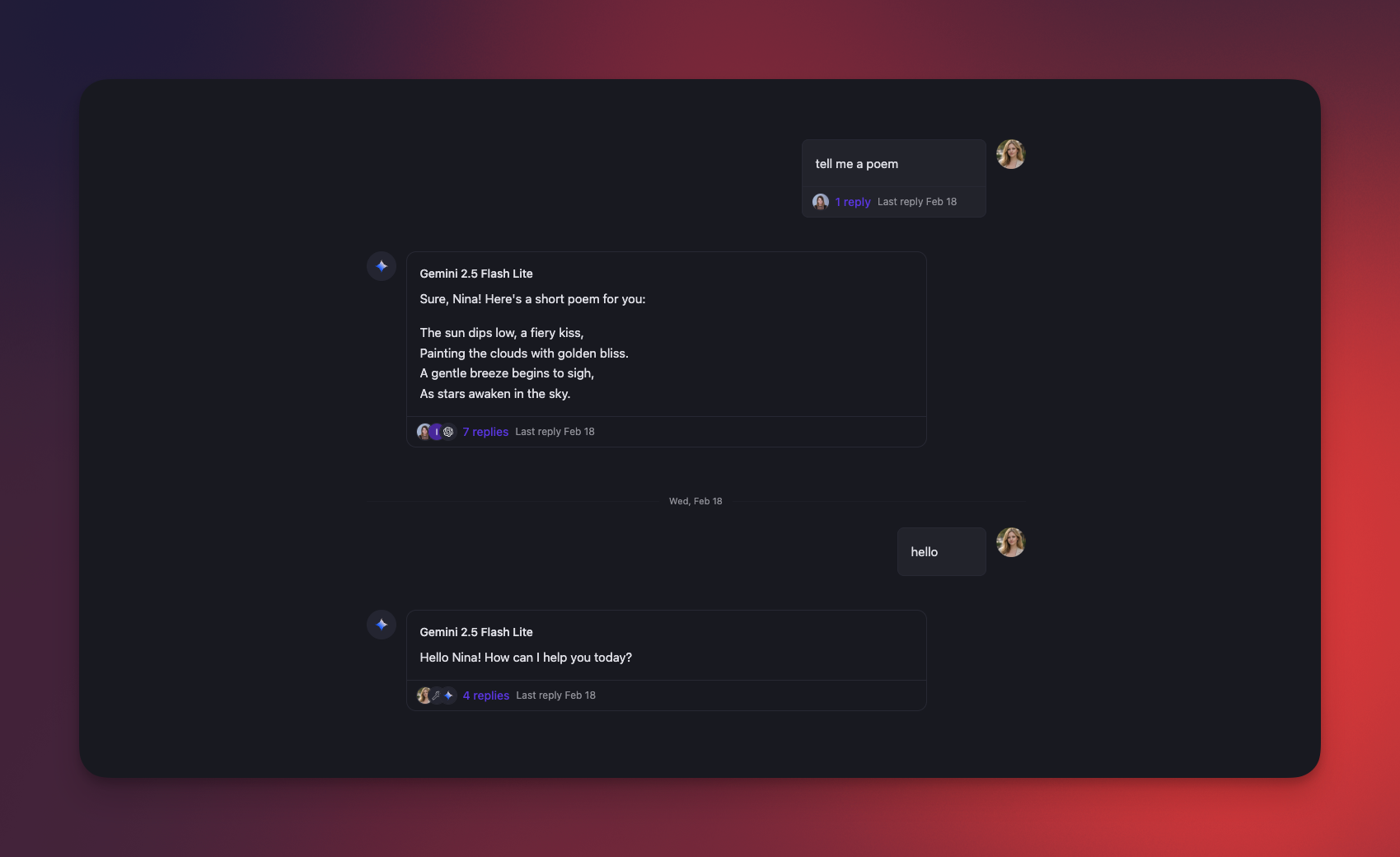
February 2026 has been all about making conversations richer and faster. We shipped Slack-like threads, upgraded our sync layer with ElectricSQL and PGlite for instant sidebar loading, added Claude Opus 4.6, introduced workspace deletion with content migration, and made channels smarter with AI controls, better editing, and personalized model lists.
Let's dive into everything that's new!
Slack-Like Threads: Conversations Within Conversations
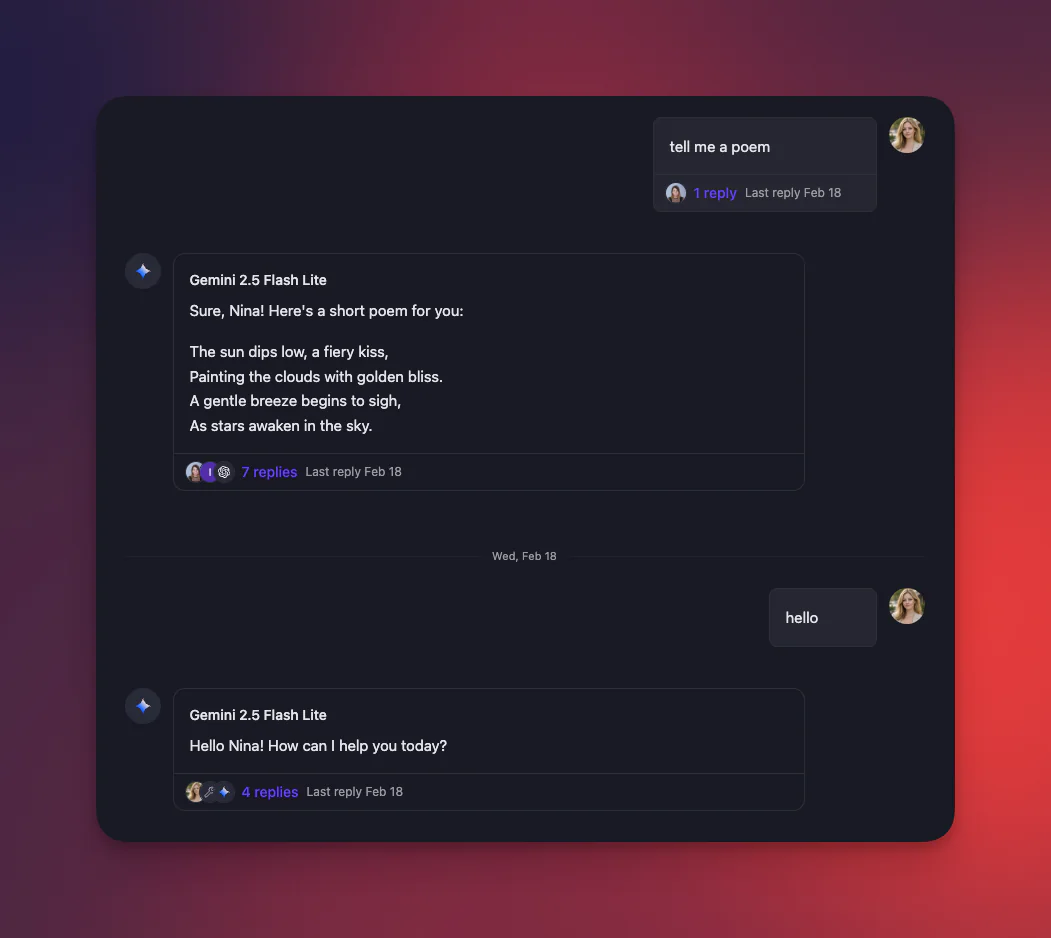
The biggest feature of the month — threaded conversations are here! You can now start a thread on any message in both chats and channels, keeping side discussions organized without cluttering the main conversation.
In shared workspaces, this is especially powerful. Your AI chats stay clean while teammates can jump into threads to discuss specific responses, share context, or collaborate on follow-ups — all without breaking the flow.
Why This Matters
- 🧵 Start a thread: Reply to any message to keep context grouped in one place
- 📌 Stay focused: The main conversation stays clean while detailed discussions happen in threads
- 🔔 Stay informed: Thread participants receive updates without noise in the main view
- 🤝 Team collaboration: Teammates can discuss AI responses in threads without interrupting the chat
Real-Time Sync with ElectricSQL and PGlite
We've upgraded how Mantle Chat keeps your sidebar in sync. Previously, updates came through WebSockets — now we've layered in ElectricSQL (a real-time sync engine for PostgreSQL) and PGlite (an in-browser PostgreSQL database) for a dramatically faster experience.
What's Changed
- 🚀 Instant sidebar updates: Your chats, channels, and folders sync in real-time across all open tabs and between team members — no manual refresh needed
- 💾 Cached locally: PGlite stores your workspace data in IndexedDB, so the sidebar loads instantly on page refresh or tab switch
- 🔄 Cross-tab sync: Open Mantle Chat in multiple tabs and they stay perfectly in sync
- ⚙️ Preferences sync: Your user preferences now sync across tabs in real-time too
This is just the beginning — real-time sync for messages and threads is coming in March.
Claude Opus 4.6: The Most Capable Claude Yet
We've added Claude Opus 4.6 — Anthropic's most powerful model — to Mantle Chat. It's available as a premium model for Pro and Team users.
What makes it special:
- 🎯 Top-tier reasoning: The strongest reasoning capabilities in the Claude family
- 🔍 Web search support: Browse the web for up-to-date information
- 🛠️ Tool use: Full MCP server integration for interacting with your connected tools
- 💡 Extended thinking: Built-in reasoning mode for complex problem-solving
Claude Opus 4.6 joins our lineup of 20+ AI models across OpenAI, Anthropic, Google, xAI, and DeepSeek — giving you the flexibility to pick the right model for every task.
Workspace Deletion with Content Migration
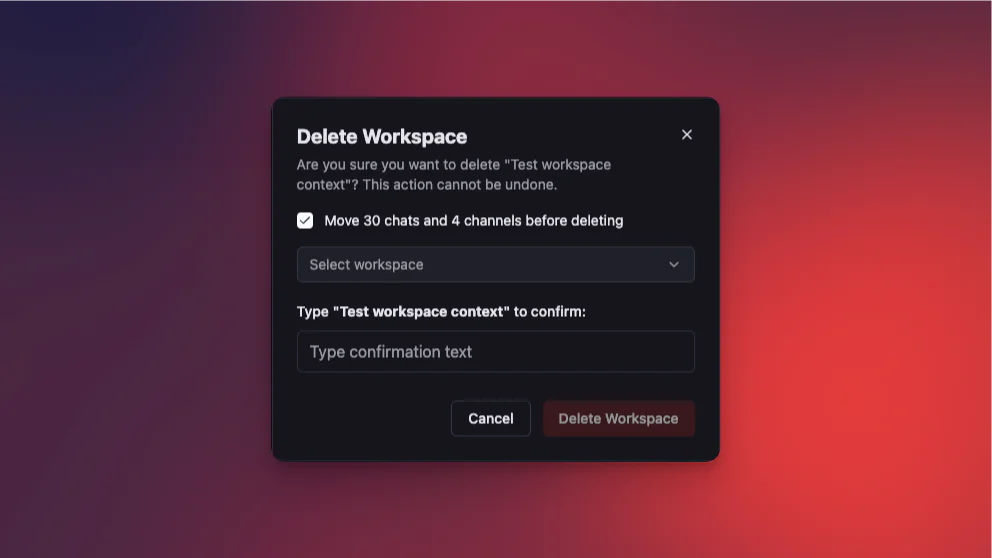
Managing multiple workspaces just got safer. You can now delete a workspace — and optionally move all its content to another workspace before deletion.
How It Works
- Open workspace settings and select "Delete Workspace"
- Review the summary: See exactly how many chats and channels will be affected
- Choose to migrate: Optionally move all content to another workspace you own
- Confirm deletion: Type the workspace name to confirm — no accidental deletions
Safety features:
- 🛡️ Owner-only: Only workspace owners can delete
- 🏠 Last workspace protection: You can't delete your only workspace
- 📦 Content migration: Move chats and channels to another workspace in one click
- ✅ Confirmation required: Type the workspace name to proceed
Channel Improvements
February brought a wave of improvements to channels, making them smarter and more polished.
AI Controls in Channels
Web search and reasoning controls are now fully available in channels! When you @mention a model that supports web search or extended thinking, the appropriate controls appear automatically — just like in regular chats.
Smarter Message Editing
Editing messages in channels is now much more powerful:
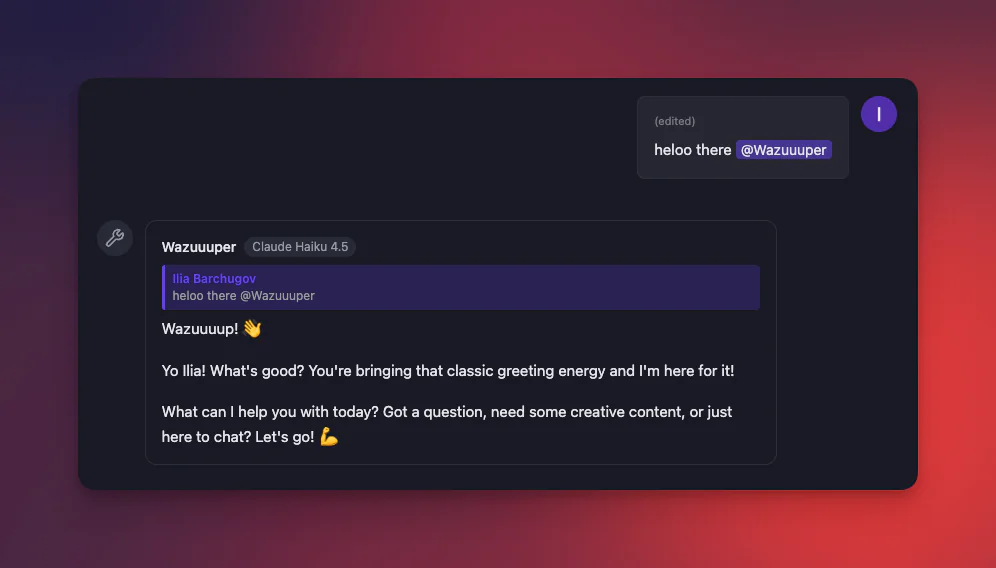
- 📝 AI re-responds to edits: When you edit a message that @mentions a model, the AI generates a fresh response based on your updated text
- 💬 Quoted messages: AI responses to edits reference the original message, keeping context clear
- 🔔 Smart notifications: New @mentions in edited messages trigger notifications for the mentioned users
Personalized Model Dropdown
The @mention dropdown for models now learns from your behavior:
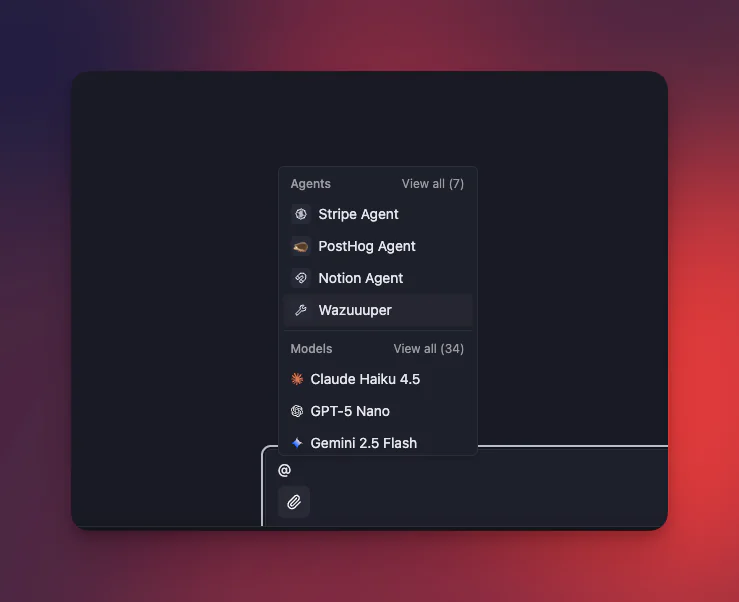
- ⭐ Recently used models first: Your most-used models appear at the top
- 🆕 Smart cold-start: New users see a diverse selection from all major providers
- 📊 View all with counts: "View all (12)" shows exactly how many more options are available
- 🔤 Alphabetical browsing: Expanded view sorts models alphabetically for easy scanning
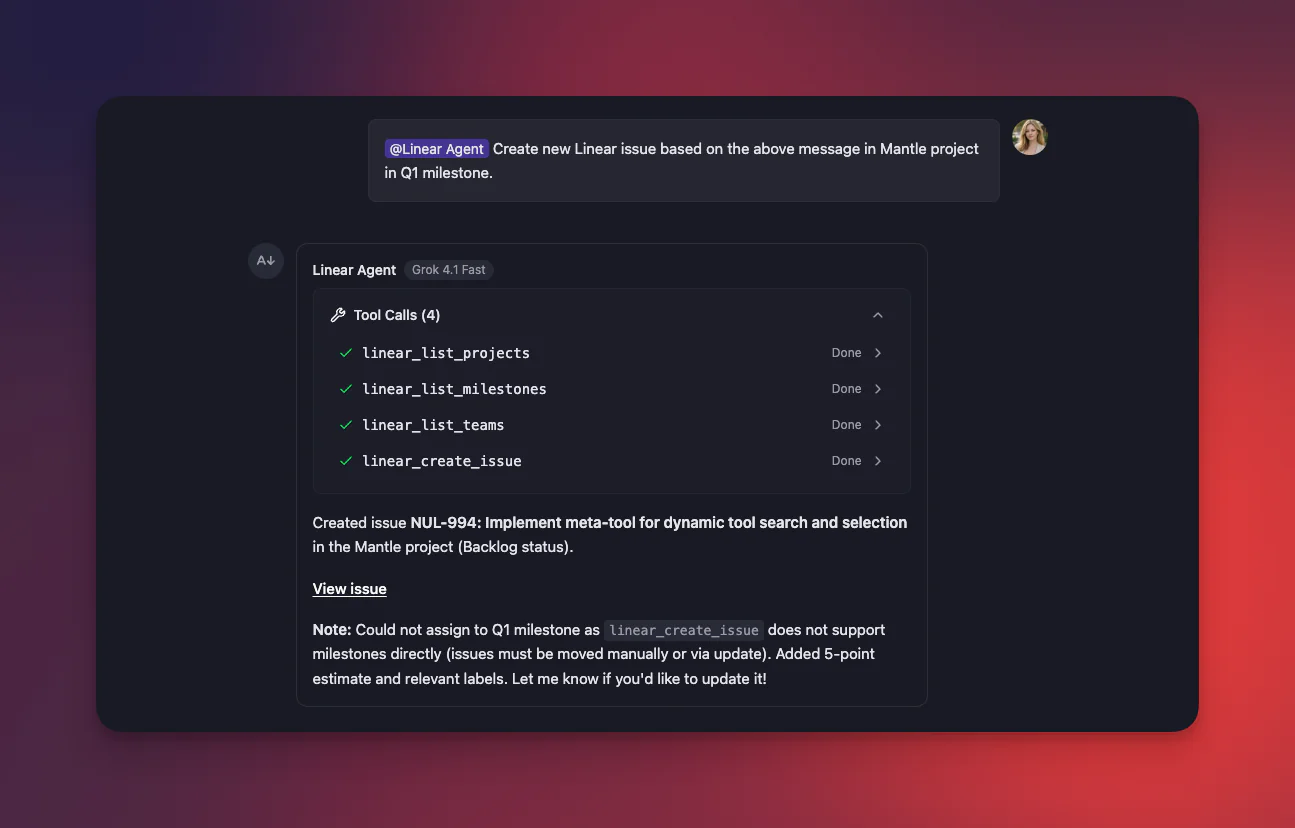
Reasoning & Tool Usage Display
Channel messages from AI models now show reasoning chunks and tool usage inline — you can see when the model is thinking through a problem and when it's calling external tools via MCP servers.
Better Text Formatting
- Underline support: Text wrapped in
++underline++now renders correctly as underlined text - Clipboard improvements: Copy-paste from messages preserves markdown formatting — paste into the editor and your formatting stays intact
Agent Improvements
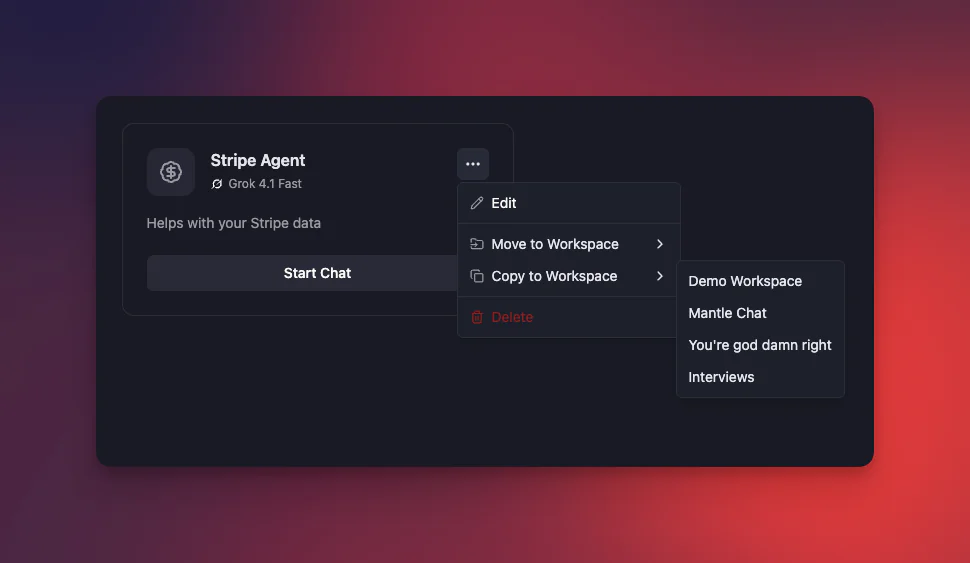
Move Agents Between Workspaces
You can now move an agent from one workspace to another. This is great when you've built a useful agent in one workspace and want to share it with another team or project.
Consistent Naming
We've completed the transition from "Assistants" to "Agents" across the entire codebase and UI — every label, dropdown, and API endpoint now uses the new terminology consistently.
Linear Notifications in Mantle Chat
Direct integration notifications from Linear now flow into Mantle Chat's notification system. When Linear events (issue created, status changed, comments) are pushed to a channel, they also appear in your notification bell — so you never miss an important update, even if you're not watching that specific channel.
Performance & Stability
Layout Persistence
Navigating between chats, channels, agents, and settings no longer remounts the layout. The sidebar, header, and workspace context stay alive as you move around — making navigation feel instant.
Infrastructure Improvements
- 🔌 Redis stability: Improved connection keep-alive settings for better reconnection
- 🐛 Reaction broadcasting fix: Emoji reactions in channels now broadcast correctly to all participants
- 🧹 Architecture cleanup: Backend refactored from "thread" to "chat" naming, making room for actual threads as a first-class feature
- 🤖 Agent chat fix: Resolved an issue where chatting with agents wasn't working properly
- 👤 Avatar fix: User message avatars now display correctly in all contexts
Thank You!
February was an incredibly productive month. From threaded conversations to real-time sync, every feature was shaped by your feedback and support. We couldn't do it without you!
Connect With Us
Have questions or feedback? We'd love to hear from you:
- 🔗 LinkedIn: linkedin.com/company/mantlechat
- 🌟 Peerlist: peerlist.io/katja/project/mantle-chat
- 🚀 Product Hunt: producthunt.com/products/mantle
- 🐦 X/Twitter: x.com/mantlechat
- 📸 Instagram: instagram.com/mantle.chat
- 📺 YouTube: youtube.com/@mantlechat
- 💬 Discord: discord.gg/STzq94kdDC
What's Next?
March is shaping up to be exciting:
- ⚡ Real-time messages and threads: Extending ElectricSQL sync to messages and thread replies
- 🤖 AI Agents improvements: Making agents more powerful and easier to configure
- 🔌 More integrations: Expanding our catalog of connected tools and services
- 💬 Channel improvements: Continuing to refine the channel experience
Stay tuned for more updates!
Let's build the future of AI collaboration together. 🚀
— The Mantle Chat Team