

updates · features · collaboration · AI models · bug fixes
Mantle Chat Weekly Update: Oct 29 - Nov 5, 2025
By Mantle Chat Team · Nov 5, 2025 · 8 min read

We've been busy this week shipping features that make Mantle Chat more powerful, reliable, and user-friendly. From automated workspace management to enhanced collaboration features, here's everything new in Mantle Chat.
New Features
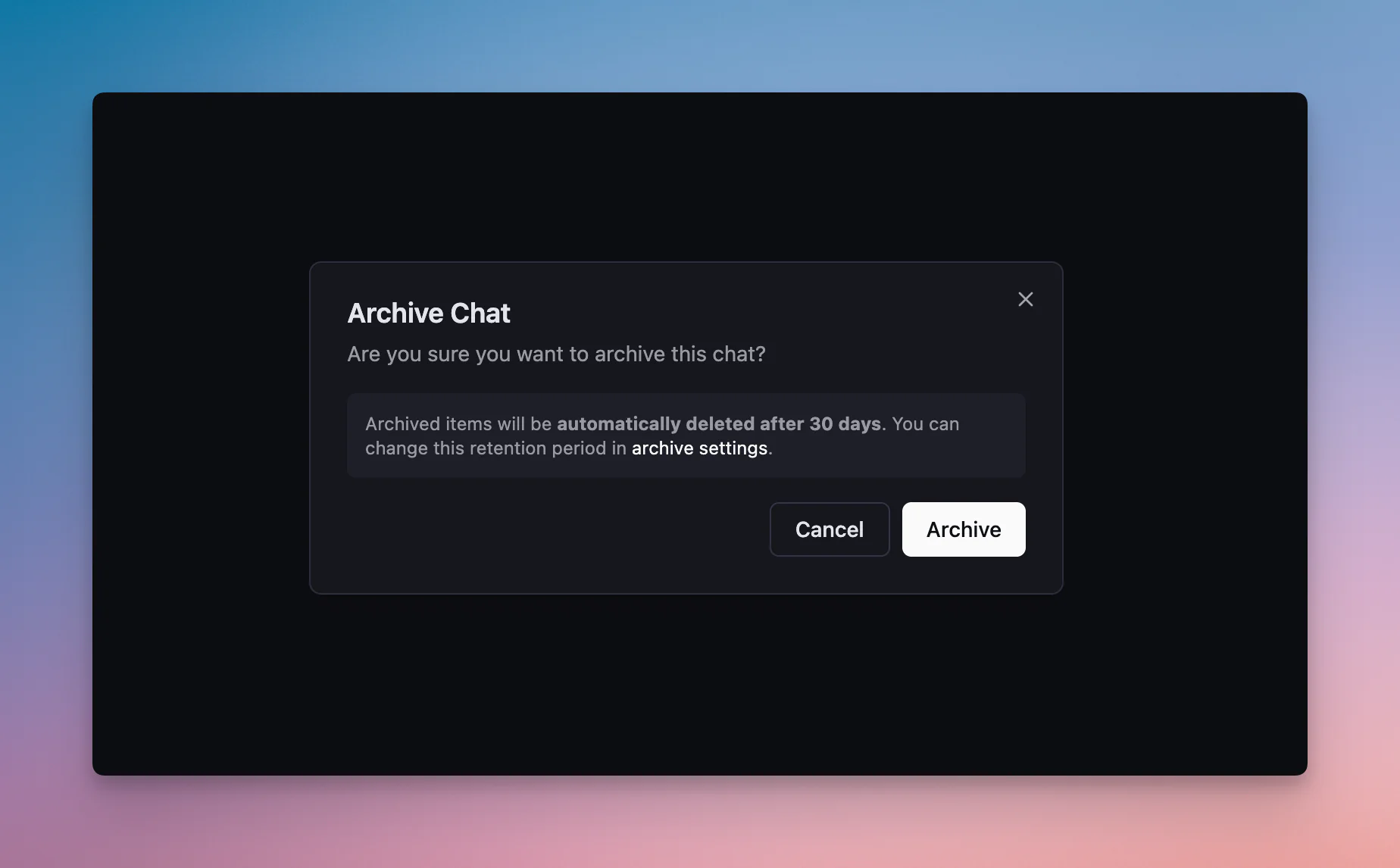
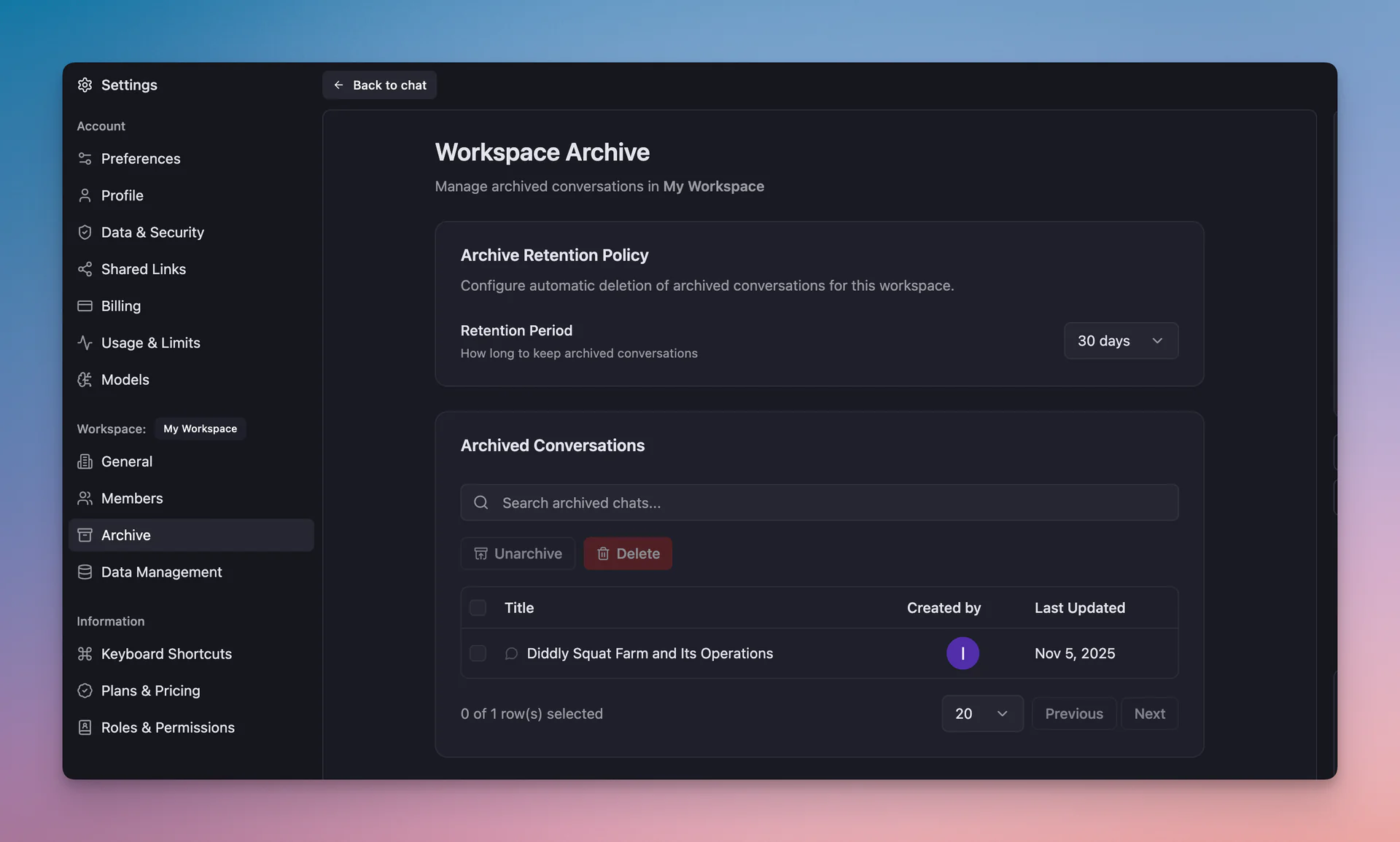
Automated Archive Management & Retention Policies
Keeping your workspace clean just got easier. We've introduced a complete archive management system that gives you control over how long archived conversations are retained.
What's new:
- ⏰ Scheduled Cleanup System: Archived chats are automatically deleted based on your workspace-specific retention policies
- 🎛️ Workspace-Level Controls: Owners and admins can now configure auto-delete settings and custom retention periods for each workspace
This feature helps teams maintain clean workspaces while ensuring compliance with data retention policies — all automatically.
Enhanced Workspace Visibility
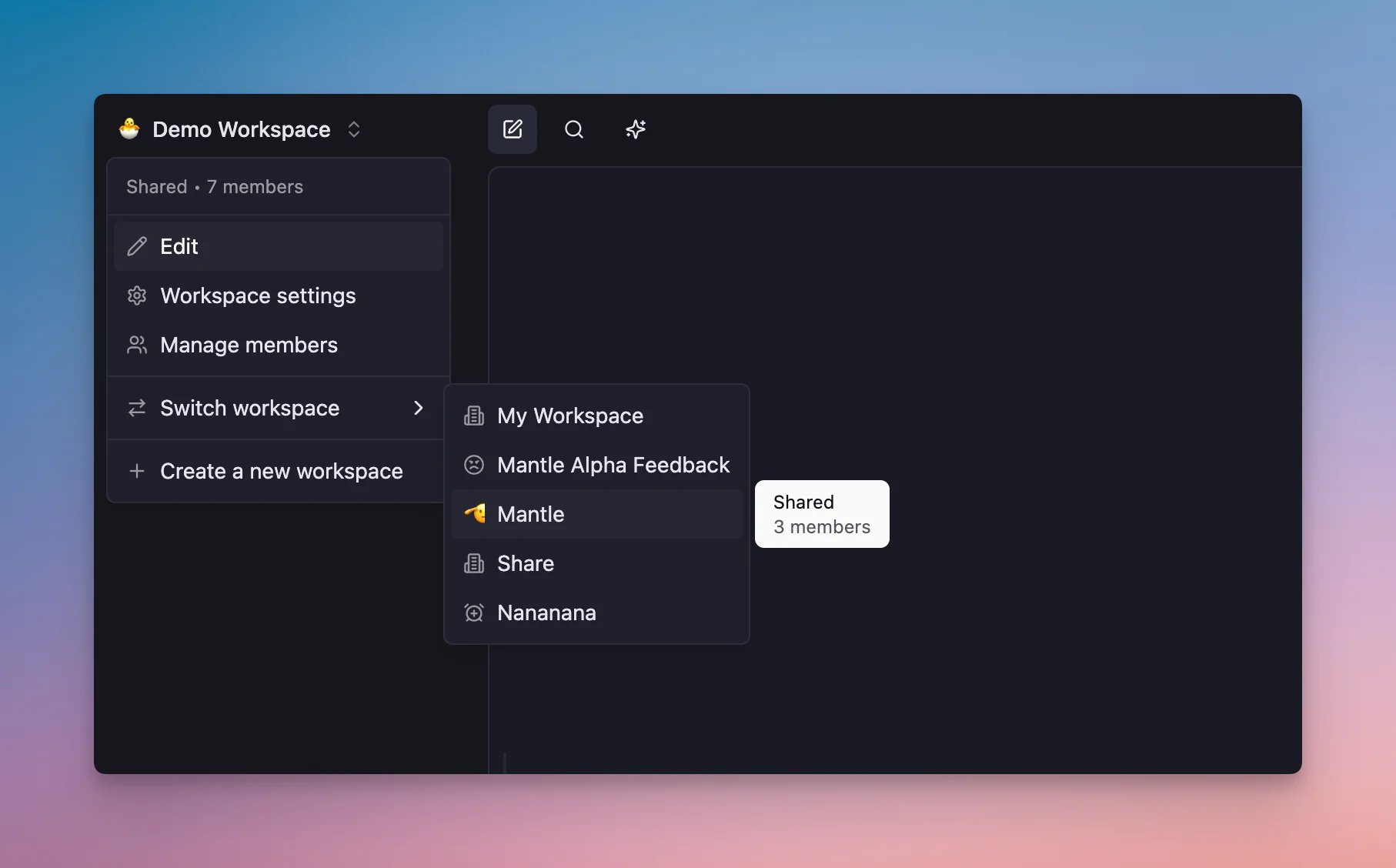
Understanding your workspace membership and sharing status is now easier with improved visual indicators throughout the app.
What's new:
- 👤 Member Count Display: See exactly how many people are in each workspace directly in tooltips and menus
- 🔒 Shared/Private Status: Clear indicators show whether a workspace is "Shared" or "Private" at a glance
These improvements make it easier to understand your workspace structure and manage team collaboration.
Mobile Usage Statistics
New bottom sheet interface makes viewing usage stats and managing plans seamless on mobile devices.
Major Improvements
Message Drafts Now Work Everywhere
One of the most requested fixes: auto-save drafts now work correctly in both channels and chats.
What's fixed:
- 📝 Channel Draft Support: Previously, auto-save only worked in chats — now it works in channels too
- 🎯 Context-Aware Persistence: Drafts are properly associated with either channels or chats depending on your current view
- 🔄 Workspace Switching: Drafts are preserved even when you switch workspaces
Message Regeneration Preserves Your Settings
When you regenerate a message, Mantle Chat now remembers all your original settings.
What's improved:
- 🔍 Web Search State Preserved: If you had web search enabled, regeneration maintains that setting
- 🧠 Reasoning Settings Maintained: Reasoning mode and effort levels are kept across regenerations
- ✨ Consistent Experience: Edit or regenerate messages without re-configuring your preferences
Persistent Scroll Position in Chats
Never lose your place in a conversation again. Mantle Chat now remembers exactly where you were scrolling.
How it works:
- 💾 Position Memory: When you navigate away from a chat or channel, your exact scroll position is saved
- 🎯 Smart Restoration: Return to the same conversation and you're right back where you left off
- 📏 Message-Level Accuracy: Works by both message ID and pixel offset for precision
This is especially useful for long conversations or when you're catching up on team discussions.
Bulletproof Session Management
We've completely overhauled how Mantle Chat handles expired sessions, making the experience seamless even when your login expires.
What's new:
- 🚨 Automatic Detection: Expired sessions are detected instantly and handled automatically
- 🔄 Smart Redirects: After re-login, you're returned to the exact page you were trying to access
- ✅ No More Errors: Invalid session states are handled gracefully without interruption
Workspace-Aware Search
Search results now intelligently adapt when you switch workspaces.
What's improved:
- ⚡ Automatic Refresh: Search results update immediately when switching workspaces
- 🧹 Clean Transitions: Search cache is cleared to prevent stale results across workspace switches
- 🎯 Context Preservation: Search query is maintained and re-run in the new workspace context
Bug Fixes
UI & Rendering Improvements
👤 Avatar Rendering Fixed: We fixed a frustrating bug where avatars would render incorrectly in search results. The issue was caused by SVG ID collisions when multiple avatars were displayed. Now each avatar uses unique IDs, ensuring crisp, glitch-free rendering in all contexts.
🎯 Model Selector Closing: The model selector sometimes wouldn't close when clicking outside of it. This has been fixed — clicking anywhere outside the selector now properly dismisses it.
⏹️ Stopped Message Display: When you stopped an AI response mid-generation, the UI would continue showing "Thinking..." with a loading animation. Now it correctly displays "Response stopped" with a stop icon, giving you clear feedback.
📁 Folder Creation Clarity: The "New Folder" button in Date View mode didn't explain why it was disabled. Now it shows a helpful tooltip explaining that folders can't be created in chronological date view.
👁️ Folder Visibility: New folders created while in Date View weren't immediately visible. Now they appear correctly when you switch to Folders View.
Message Formatting
↩️ Line Break Preservation: User messages now preserve your original formatting, including line breaks. Previously, formatting would sometimes be lost when sending messages.
Collaboration & Presence
This week brought significant stability improvements to real-time collaboration features:
🟢 Presence Indicator Reliability: Online/offline status indicators are now much more stable and accurate, properly reflecting user presence in shared workspaces.
✍️ Typing Indicators Fixed: Typing indicators on presence avatars now display correctly and continue showing as long as someone is actively typing (previously stopped after 10 seconds).
🔒 Chat Access Security: Added stricter security checks to ensure only authorized users can access chat messages. Unauthorized access attempts are logged and denied.
🔢 Message Ordering: Improved message delivery in shared workspaces to prevent duplicate or out-of-order events when multiple people are collaborating simultaneously.
AI Model Updates
Gemini Model Enhancements
We've updated our Gemini integration to use the latest stable model identifiers and capabilities:
Updated Models:
- ⚡
gemini-2.0-flash-001: Stable identifier for Gemini 2.0 Flash - 🪶
gemini-2.0-flash-lite-001: Lighter version for faster responses - 🚀
gemini-2.5-flash: Next-generation Flash model - 💎
gemini-2.5-pro: Most capable Gemini model
What's improved:
- 📈 Higher Limits: Gemini 2.5 models now support increased token and context window limits
- 📚 Better Descriptions: Model metadata and use-case descriptions have been improved for easier selection
- 🛠️ Enhanced Capabilities: Updated reasoning and streaming support configuration for all Gemini variants
- ✅ Expanded Test Coverage: New tests ensure vision support and capabilities are correctly reported
What's Next?
We're continuing to focus on performance, reliability, and collaboration features.
Try Mantle Chat Today
Experience all these improvements yourself at mantle.chat. Whether you're working solo or collaborating with a team, Mantle Chat brings ChatGPT, Claude, and Gemini together in one powerful workspace.
New to Mantle Chat? Start with our complete features guide to learn everything the platform can do.
Have feedback on these updates or suggestions for future features? We'd love to hear from you — reach out to our team or join the conversation in our community.